
Octo Browser Review 2026: Pricing, Fingerprint Tests and Best Alternative
Octo Browser is one of the strongest antidetect browsers we tested in 2026. It passed Pixelscan, Iphey and CreepJS on default settings and was already running the latest Chrome 154 on our test day. Gologin passed the same three checkers. The difference is mostly price and access: Octo has no free plan and only a 2-day trial, and for the same number of profiles it costs 1.5 to 3 times more than Gologin on monthly billing and 2 to 4.5 times more on yearly plans, before VAT.
In this review I go through Octo’s interface, proxies, everyday comfort, mobile apps, support and updates, then compare test results and prices with Gologin. Prices were checked on both vendors’ sites on October 20, 2026. The fingerprint tests come from our 12-browser antidetect test.
 Flash Sale! Use code OCTO50 to get 50% off your first Gologin purchase!
Switching from Octo Browser? Gologin takes 90% off your first month on any plan size: 10 profiles for $0.90, 100 profiles for $3.90. Claim the Octo Browser switch offer →
Octo Browser vs Gologin: Summary Table
| Octo Browser | Gologin | |
|---|---|---|
| Pixelscan | ✅ Consistent | ✅ Consistent, no proxy detected |
| Iphey | ✅ Trustworthy (MX 100) | ✅ Trustworthy (MX 100) |
| CreepJS (headless / stealth / like headless) | 0% / 0% / 25% | 0% / 0% / 31% |
| Chrome engine on test day (latest stable: 154) | 154 | 152 (Orbita) |
| Median launch of a new profile | 4.8 s | 4.0 s |
| Free plan | No | 3 profiles, forever |
| Free trial | 2 days of Starter with promo code TRIAL, new users only | 7 days of all features, no card required |
| Entry paid plan | Lite: €10/mo, €7/mo yearly (3 profiles) | Professional 10: $9/mo, $4.50/mo yearly (10 profiles) |
| 100 profiles | €79/mo, €56/mo yearly | $39/mo, $19.50/mo yearly |
| 1,000 profiles | €329/mo, €231/mo yearly (1,200 profiles) | $179/mo, $89.50/mo yearly |
| Long-term discounts | 10% / 20% / 30% for 3 / 6 / 12 months | 50% yearly |
| Taxes | Prices exclude VAT | — |
| API | From Base (€79/mo): 50 requests/min | REST API, SDKs and MCP server from Professional 100 ($39/mo) |
| Team members | From Team (€169/mo): 3 included, up to 6; unlimited on Advanced | Profile and folder sharing from Professional 25; advanced team management on Custom |
| Proxies | Proxy Shop: residential and mobile, UDP support, from €2.8/GB; VPN per profile | 2 GB residential traffic from Professional 25; residential, mobile and datacenter proxies in-app |
| Mobile | iOS and Android apps; 100 free profiles for new mobile users | Native Android and iOS apps synced with desktop; cloud Android minutes in every plan |
| Web version | No | Cloud Browser via web from Professional 50 |
| Reviews | Trustpilot 4.4 (85), G2 4.8 (66) | G2 4.7, Capterra 4.6 |
| Company | Blackbird Secure Browsing Ltd, London; founded by a team from Belarus | Gologin |
Choose Octo Browser if you want the newest Chrome engine, UDP proxies or VPN per profile, and the budget isn’t a concern.
Choose Gologin if you want the same clean test results at a much lower price, a free plan and a real trial, built-in proxy traffic, or a web version.
What Is Octo Browser?
Octo Browser is an antidetect browser for running many accounts from one device, launched in 2020 by a team from Belarus. The registered company is Blackbird Secure Browsing Ltd in London. Octo is especially popular with Russian-speaking affiliate marketers, media buyers and crypto teams, and it now positions itself for e-commerce, ticketing, bonus hunting and web scraping too. It runs on Windows, macOS and Linux; Linux is no longer in beta.
User Interface: Redesigned in Octo 3.0
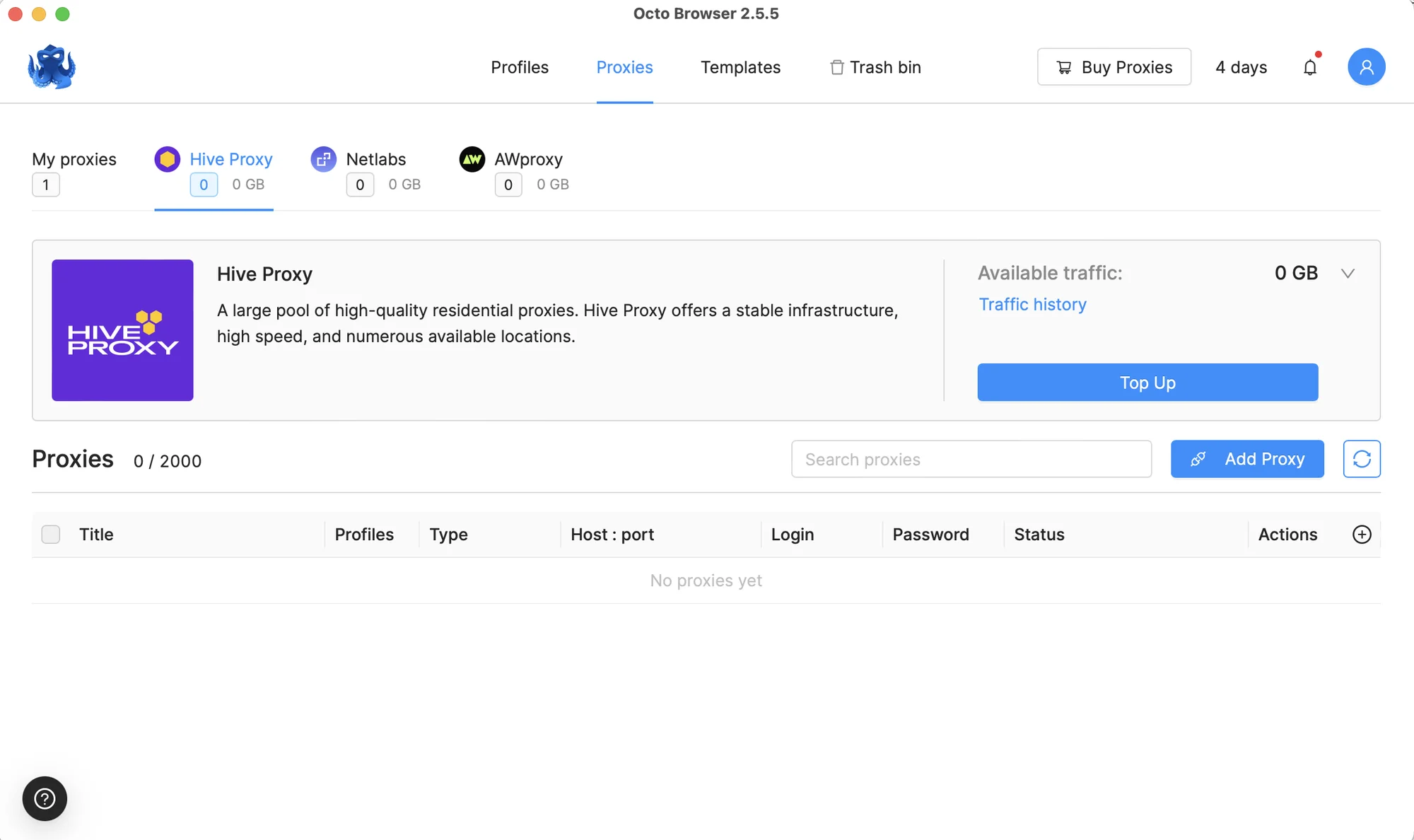
Octo’s interface was always one of its strengths: clean, calm and quick to learn. In July 2026, Octo 3.0 rebuilt the navigation around a left sidebar. Profiles, Proxies, Templates, Trash bin, Team, Action log and a new Extensions section now sit in one menu that collapses to icons. A subscription indicator at the bottom shows how many profiles you use and how many days remain.

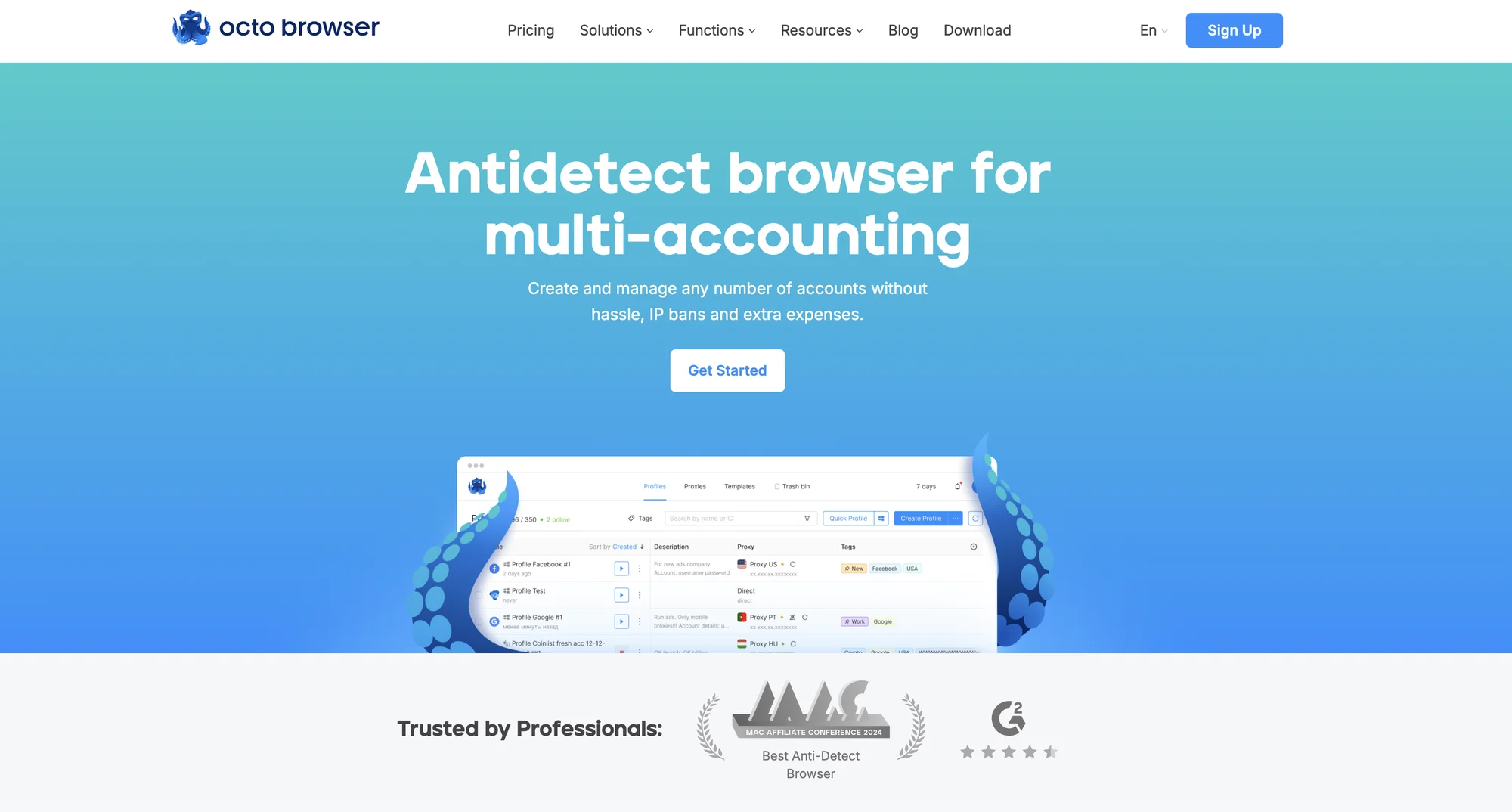
Octo Browser dashboard at the start of our launch test, October 2, 2026
The profile creation screen is split into sections, and most fingerprint settings have an auto mode, so a new user can get a working profile quickly. You can also keep several Octo accounts signed in and switch between them in two clicks, which helps if you work for more than one team.
What’s still missing is onboarding. On first login there are no tooltips or guided steps; the app assumes you already know what an antidetect browser does.

Octo Browser interface
Proxy Integrations
Proxies are where Octo changed the most this year. The built-in Proxy Shop sells residential and mobile proxies from a pool of over 60 million IPs in more than 195 locations, starting at €2.8 per GB, with volume discounts of up to 60%. Octo 3.1, released in September 2026, added mobile proxies from Hive Proxy and a new provider, Nodyx, with residential and mobile proxies that support UDP. UDP support matters for sites that check how the browser handles that protocol.

Octo’s built-in Proxy Shop, October 20, 2026
Octo 3.1 also lets you assign a VPN to a single profile, like a proxy, using WireGuard or AmneziaWG configs. Profiles on a VPN can spoof the operating system at the network level as Windows, macOS or Android. Octo says it’s the only antidetect browser doing this today. The profile list now also shows the IP of each profile’s last launch.
Everyday proxy work has improved too. Saved proxies live in a Proxy Manager, can be edited, imported and checked in bulk, attached through templates and shared across a team. You can still add your own HTTP(S), SOCKS5 or SSH proxies.
No proxy traffic is included in Octo’s plans; you top up the Proxy Shop balance separately. Gologin includes 2 GB of residential traffic a month from Professional 25 and sells residential, mobile and datacenter proxies inside the app.
Comfort of Use: Folders at Last
For years the biggest complaint about Octo was organization: profiles could only be grouped with tags, and mass actions were thin. Octo 3.0 fixed the first part. Folders now appear as tabs above the profile list, with drag-and-drop ordering and per-member access rights. Folders also work in templates, bulk creation, imports and the API. The number of folders depends on your plan.
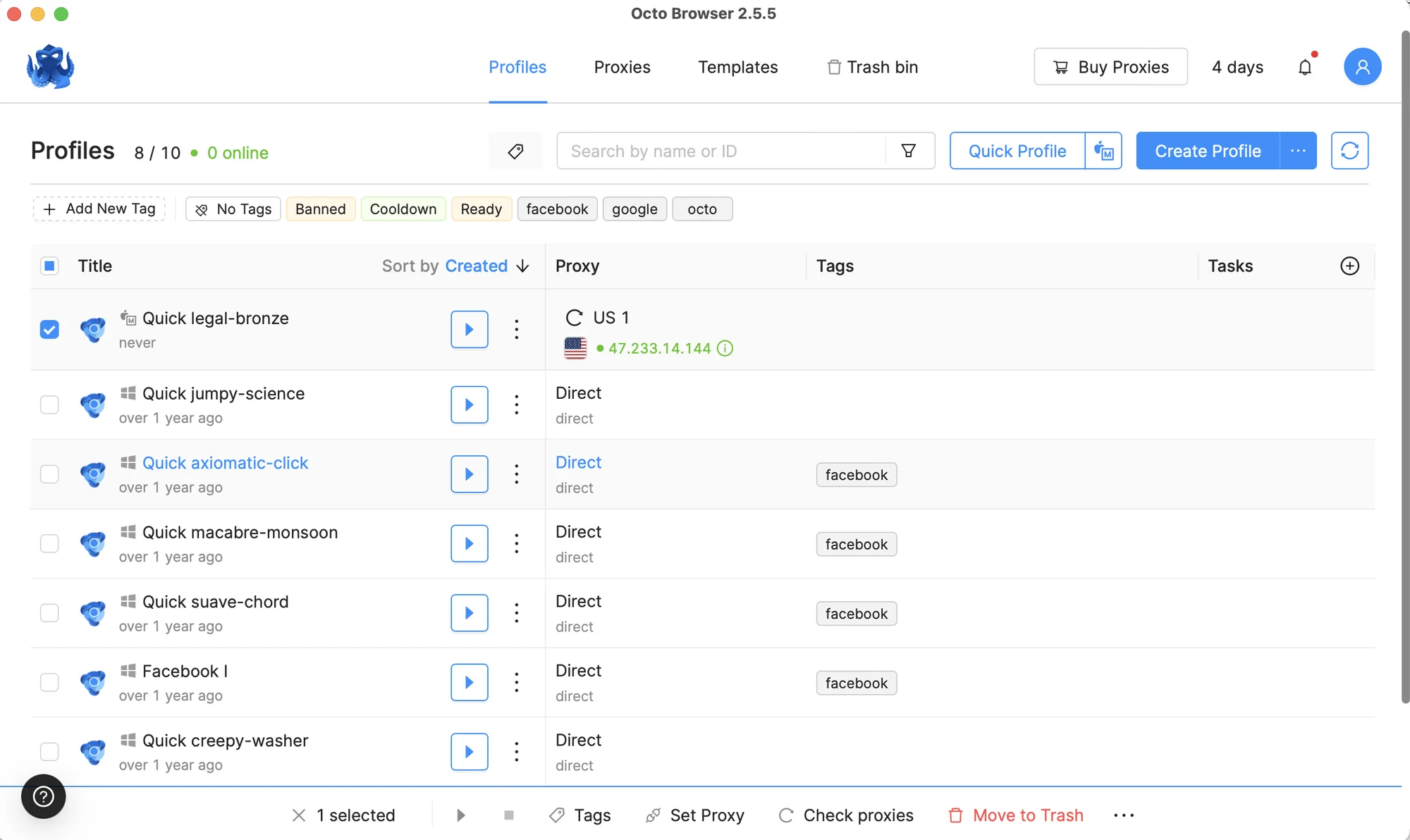
Other tools that help at scale:
- Profile templates on every plan, and bulk import and checks for proxies
- One-time profiles: temporary profiles you can start through the API
- Profile tasks, from the Base plan
- Command-line switches and traffic-saving options such as blocking large images (Octo 2.8 and 2.9)
- Profile export on every plan, and profile transfer between accounts from the Base plan
Profiles start and stop quickly. In our test, three launches took 4.3, 5.9 and 4.8 seconds on a mid-range 2017 laptop.
The catch is that many of these tools depend on the plan. Lite and Starter have no profile transfer, no profile tasks, no API and no team members.
Mobile Devices and Fingerprints
This used to be a clear Octo weakness. It isn’t anymore:
- Mobile apps. Octo now has apps for iOS and Android. New users who sign up through the mobile apps get 100 profiles for free; check the current terms in the app before relying on it.
- Mobile fingerprints. Since Octo 2.7, desktop profiles can use Android fingerprints, useful for TikTok and other mobile-first platforms.
- Unlimited devices. Every plan can be used on any number of devices.
There’s still no web version: you can’t launch profiles in the cloud from a browser tab. Gologin has native Android and iOS apps synced with desktop profiles, a cloud browser you can open from any device from Professional 50, and cloud Android minutes on every plan.
Support and Updates
Octo’s support works through live chat and Telegram, and the community chat is active, mostly in Russian with a smaller English group. The help center has written guides and video tutorials. The site and app are available in English, Chinese, Spanish, Portuguese, Vietnamese, Russian and Ukrainian. Two-factor login is available, and a public service status page went live with Octo 3.1.
Major releases come every two to six months, with smaller updates in between. The last ones were 2.9 in January 2026 (traffic-saving features), 3.0 in July (new interface and folders) and 3.1 in September (mobile and UDP proxies, VPN). Octo also keeps its engine current: it was one of only two browsers in our test already on Chrome 154.

Octo Browser releases in 2025–2026
Reviews are positive. Octo has a 4.4 TrustScore from 85 reviews on Trustpilot and 4.8 out of 5 from 66 reviews on G2. Some recent reviews complain about profiles that fail to open and generic support replies; others praise the interface and the new proxy providers.
Octo has no public record of user data leaks.
Passing Checkers
We tested Octo Browser together with 11 other antidetect browsers on the same Windows 11 laptop, on the same day, with a fresh residential US proxy from FloppyData for each browser. We created a new profile with default settings, added only the proxy, and opened Pixelscan, Iphey and CreepJS in that order without restarting the profile. The full method is in our antidetect browser test.
Octo passed all three. This is a change from our earlier review, where Iphey flagged it.
- Pixelscan: consistent fingerprint. The timezone matched the proxy location.
- Iphey: Trustworthy, MX score 100.
- CreepJS: 0% headless, 0% stealth, no lies detected, “like headless” 25%. The GPU was reported with high confidence.
- Engine: Chrome 154, the latest stable version on the test day.

Pixelscan: consistent fingerprint

Iphey: Trustworthy, MX score 100

CreepJS: 0% headless, 0% stealth, Chrome 154
Gologin in the same test also passed all three: Pixelscan consistent with no proxy detected, Iphey Trustworthy at 100, and CreepJS with no headless, stealth or lie signals. Timezone, language and geolocation matched the proxy IP automatically.
To be fair about our own weak spots, Octo did slightly better in two places. Gologin’s “like headless” score was 31% against Octo’s 25%, and Gologin’s Orbita engine was on Chrome 152, two versions behind Octo. Gologin launched faster: 4.0 seconds against 4.8.
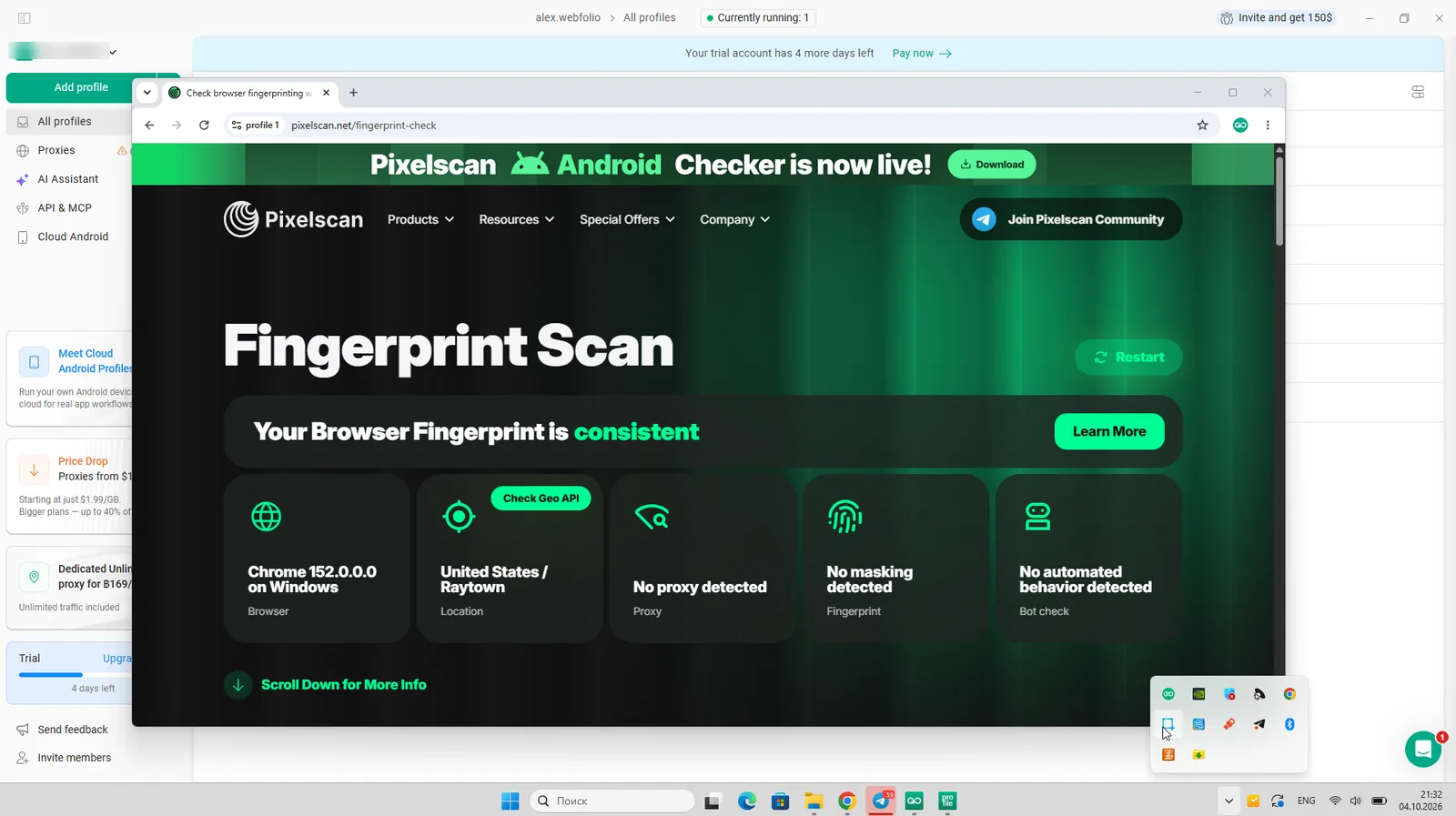
Gologin on Pixelscan: consistent fingerprint, no proxy detected
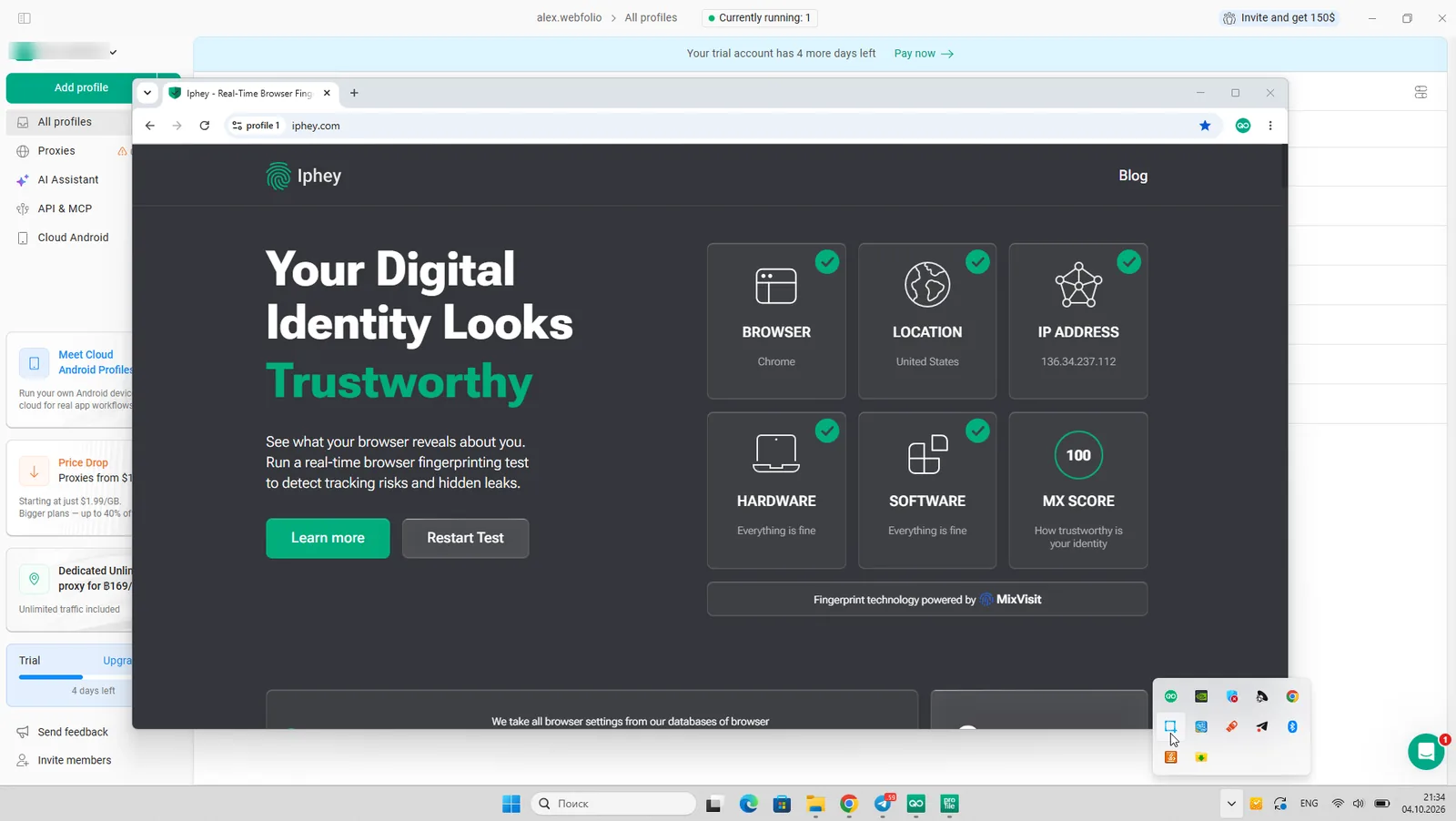
Gologin on Iphey: Trustworthy, MX score 100

Gologin on CreepJS: 0% headless, 0% stealth
A clean result doesn’t make any browser invisible. It means no checker found a leak with these settings on that day. Run your own profiles through the checkers with the proxy you’ll actually use.
Gologin: A Good Alternative to Octo Browser
At first glance Octo and Gologin look alike: clean interfaces, clean fingerprints, built-in proxies and mobile apps. The differences are in what you get for the money and how easy it is to start.
Features and Comfort of Use
Gologin is built so non-technical users can’t break a fingerprint by accident. Critical settings are automatic, and creating a profile or attaching a proxy takes one click each. You can drag and drop both columns and profiles, group profiles into folders, and share folders with partners.
Unlike Octo, Gologin has:
- A free plan with 3 profiles that never expires, and a 7-day trial of all paid features
- 2 GB of residential proxy traffic a month from Professional 25
- A cloud browser you can launch from any device, from Professional 50
- Native Android and iOS apps that sync with desktop profiles, plus 30 to 120 cloud Android minutes a month on every plan
- A REST API, SDKs and an MCP server for AI agents from Professional 100, with Puppeteer, Playwright and Selenium support
- The option to run profiles on earlier Chrome kernel versions
Download Gologin for free and manage all your accounts securely in one place. Try for free →
Proxy Integrations
Gologin sells residential, mobile and datacenter proxies in 195 countries inside the app. Paid plans from Professional 25 include 2 GB of residential traffic, renewed every month. Timezone, language and geolocation are set from each proxy IP automatically.
Mobile App and Web Version
Gologin’s web version lets you launch and edit profiles from any device without installing anything; they run on a secure cloud server. The Android app and the iOS app for iPhone and iPad sync with your desktop profiles, so you can start on a computer and continue on your phone. Octo has mobile apps too, but no web version.
Support Quality
Gologin support is available 24/7 via live chat, email, Messenger, WhatsApp and Telegram, and chat replies usually come within 5 minutes. A dedicated API developer handles technical questions. Gologin is rated 4.7 on G2 and 4.6 on Capterra.
Updates Frequency
Gologin updates the app and its Orbita engine frequently, and updates install automatically: you only need to restart the browser. Users often name stable 24/7 operation as the reason they move to Gologin from other browsers.
Octo Browser vs Gologin: Pricing
Free Plans and Trial Periods
Octo has no free plan. The only free option on desktop is a 2-day trial of the Starter plan with the promo code TRIAL, for new users only. New users who sign up through the mobile apps get 100 free profiles, according to Octo’s site banner.
Gologin has a free plan with 3 profiles that never expires and a 7-day trial of all paid features, with no card required.
Octo Browser Prices in 2026
Octo has five plans plus Custom. Paying for 3, 6 or 12 months saves 10%, 20% or 30%. Prices are in euros and exclude VAT. Prices from Octo’s pricing page on October 20, 2026:
| Octo plan | Profiles included | Max profiles | Team members | API | Monthly | Yearly (per month) |
|---|---|---|---|---|---|---|
| Lite | 3 | 3 | — | — | €10 | €7 |
| Starter | 10 | 30 | — | — | €29 | €21 |
| Base | 100 | 200 | — | 50 RPM, 500 RPH | €79 | €56 |
| Team | 350 | 600 | 3 (up to 6) | 100 RPM, 1,500 RPH | €169 | €119 |
| Advanced | 1,200 | 100,000 | 8 (unlimited) | 200 RPM, 3,000 RPH (up to 1,000 RPM) | €329 | €231 |
| Custom | Unlimited | Unlimited | Unlimited | Unlimited | On request | On request |
Add-ons, monthly prices:
- Extra profiles: about €1 each on Starter (20 more cost €20), €0.70 on Base (100 more cost €70), €0.30 on Team (250 more cost €75) and €0.20 on Advanced (800 more cost €160).
- Extra team members: €25 a month each on Team, €20 on Advanced.
- Downgrades are possible only after the current subscription ends, and you must first delete anything above the new plan’s limits.

Octo Browser pricing with yearly billing, October 20, 2026

Octo Browser pricing with monthly billing, October 20, 2026

Octo Browser features by plan, October 20, 2026
Gologin Prices in 2026
Prices from Gologin’s pricing page on October 20, 2026:
| Gologin plan | Profiles | Monthly | Yearly (per month) | Proxy traffic | Cloud Android min/mo |
|---|---|---|---|---|---|
| Free | 3 | $0 | $0 | — | — |
| Professional 10 | 10 | $9 | $4.50 | — | 30 |
| Professional 25 | 25 | $19 | $9.50 | 2 GB | 30 |
| Professional 50 | 50 | $29 | $14.50 | 2 GB | 30 |
| Professional 100 | 100 | $39 | $19.50 | 2 GB | 30 |
| Business 300 | 300 | $99 | $49.50 | 2 GB | 60 |
| Business 500 | 500 | $139 | $69.50 | 2 GB | 60 |
| Enterprise | 1,000 | $179 | $89.50 | 2 GB | 120 |
| Custom | 2,000+ | from $279 | from $139.50 | 2 GB | 120 |
Profile shares start on Professional 25. Cloud browser access and cookie import and export start on Professional 50. The synchronizer, Cookie Bot, custom extensions, REST API and MCP server start on Professional 100. Business 500 and above add Cloud Android and AI agentic workflows. Custom adds advanced team management.

Gologin Personal plans with yearly billing, October 2026

Gologin Business plans with yearly billing, October 2026
Personal Use
For solo work the gap is wide. Octo’s Lite plan gives you 3 profiles for €10 a month, which is less than Gologin’s free plan. Starter costs €29 a month for 10 profiles; Gologin’s Professional 10 costs $9. For 100 profiles, Octo Base costs €79 a month and Gologin Professional 100 costs $39, including 2 GB of proxy traffic.
Octo’s long-term discounts are more flexible (3, 6 or 12 months), but Gologin’s yearly discount is deeper: 50% against Octo’s 30%.
Team Plans
Octo includes team members only from the Team plan: 3 seats for €169 a month, with up to 3 more at €25 each. Advanced includes 8 seats and allows unlimited extra seats at €20 each. API access starts on Base.
Gologin includes profile and folder sharing from Professional 25. Its REST API starts on Professional 100.
Price for the Same Number of Profiles
The two price ladders don’t line up, so here is the cost of the cheapest plan that covers each profile count. Octo prices are in euros without VAT and Gologin prices are in US dollars, so the real gap is larger than the numbers suggest.
| Profiles | Octo plan | Octo monthly | Octo yearly (per month) | Gologin plan | Gologin monthly | Gologin yearly (per month) |
|---|---|---|---|---|---|---|
| 3 | Lite | €10 | €7 | Free | $0 | $0 |
| 10 | Starter | €29 | €21 | Professional 10 | $9 | $4.50 |
| 25 | Starter + 20 (30) | €49 | €35 | Professional 25 | $19 | $9.50 |
| 50 | Base (100) | €79 | €56 | Professional 50 | $29 | $14.50 |
| 100 | Base | €79 | €56 | Professional 100 | $39 | $19.50 |
| 300 | Team (350) | €169 | €119 | Business 300 | $99 | $49.50 |
| 500 | Team + 150 | €214 | €150 | Business 500 | $139 | $69.50 |
| 1,000 | Advanced (1,200) | €329 | €231 | Enterprise | $179 | $89.50 |
| 2,000 | Advanced + 800 | €489 | €343 | Custom | $279 | $139.50 |
The short version: Gologin is cheaper at every profile count, on both monthly and yearly billing. On monthly billing Octo costs 1.5 to 3 times more; on yearly plans, 2 to 4.5 times more, and that’s before converting euros to dollars and adding VAT to Octo. Octo’s higher plans do include more team seats and higher API limits, so compare those too if you run a large team.
Octo Browser Pros and Cons
Pros
- Passed Pixelscan, Iphey and CreepJS on default settings
- Latest Chrome engine (154) on our test day
- Clean interface, now with folders and a sidebar
- Proxy Shop with mobile and UDP proxies; VPN per profile with network-level OS spoofing
- iOS and Android apps; Android fingerprints on desktop
- High API limits and unlimited seats on the Advanced plan
Cons
- No free plan; only a 2-day trial for new users
- 1.5 to 4.5 times more expensive than Gologin for the same profiles, depending on billing, and prices exclude VAT
- No team members below the €169 Team plan, and no API below the €79 Base plan
- No proxy traffic included in plans
- No web version
- Downgrades only after the current term ends
Best Octo Browser Alternatives in 2026
All of these took part in our October 2026 test:
| Alternative | Result on Pixelscan / Iphey / CreepJS | Paid from | Best for |
|---|---|---|---|
| Gologin | Passed all three | $9/mo, $4.50/mo yearly | Clean fingerprints at a low price, free plan, Android and iOS apps |
| Hidemium | Passed all three | $153/year | Budget users who want AI-assisted automation |
| AdsPower | Pixelscan and Iphey failed | $9/mo, $5.40/mo yearly | No-code RPA |
| Dolphin Anty | Iphey: Unreliable (50) | $10/mo (20 profiles) | Media buying teams on Chrome 154 |
| Multilogin | Iphey: Unreliable (90) | $149/year | Larger teams with enterprise needs |
| GeeLark | Iphey: Unreliable (90) | $9.75/mo yearly | Cloud Android phones for TikTok |
For free options, see our list of the best free antidetect browsers.
How to Switch from Octo Browser to Gologin
- Export your profiles’ cookies from Octo and save your proxy list.
- Download Gologin and create an account. The 7-day trial unlocks every feature, no card required.
- Create profiles in bulk and import the cookies. Cookie import and export is available from Professional 50.
- Paste your proxy list into the Location column, or use Gologin’s built-in proxies. Timezone, language and geolocation are set from each proxy IP.
- Open Pixelscan in one profile to check that the IP and fingerprint match before you log in to your accounts.
Leaving Octo Browser? Get 90% off your first Gologin month on any plan: $0.90 for 10 profiles, $3.90 for 100, $17.90 for 1,000. No card needed to claim the code. Get the Octo Browser switch offer →
Octo Browser vs Gologin: Summary
Octo Browser is a mature, well-built tool. It passed every fingerprint check in our test, runs the newest Chrome engine, and in 2026 fixed its biggest gaps: folders, mobile apps, mobile fingerprints and better proxies. If budget isn’t a concern and you need UDP proxies or a VPN per profile, it’s a strong choice.
Gologin passed the same three checkers and covers the same core needs for much less money. You get a free plan, a full 7-day trial, proxy traffic in the plan, a web version and mobile apps. For most solo users and small teams, that difference decides it.
Before you choose, answer a few questions:
- How many browser profiles do you need now and in six months?
- Will you share profiles with a team or partners, and how many seats will that take?
- How much are you willing to pay for the browser and proxies together?
- What do reviews, forums and communities say about each tool?
- Can you test the browser for free with the proxies you’ll actually use?
Gologin has a free plan and a 7-day trial for that last step. Flash Sale! Use code OCTO50 to get 50% off your first Gologin purchase!
FAQ
Is Octo Browser free?
No. Octo Browser has no free plan. New users can try the Starter plan free for 2 days with the promo code TRIAL, and new mobile-app users get 100 free profiles. The cheapest paid plan, Lite, costs €10 a month for 3 profiles. Gologin’s free plan includes 3 profiles and never expires.
How much does Octo Browser cost in 2026?
Lite costs €10 a month for 3 profiles, Starter €29 for 10, Base €79 for 100, Team €169 for 350 profiles and 3 team members, and Advanced €329 for 1,200 profiles and 8 members. Paying for 12 months saves 30%. Prices exclude VAT.
Is Octo Browser detectable?
In our October 2026 test Octo Browser passed Pixelscan, Iphey and CreepJS on default settings and ran Chrome 154. No antidetect browser is invisible, so check your own profiles with the proxies you plan to use.
Is Octo Browser better than Gologin?
Both passed all three fingerprint checkers in our test. Octo had a newer engine and offers UDP proxies and a VPN per profile. Gologin costs 1.5 to 4.5 times less for the same number of profiles, depending on billing, and has a free plan, a 7-day trial, included proxy traffic and a web version.
Does Octo Browser have a mobile app?
Yes. Octo Browser has apps for iOS and Android, and desktop profiles can use Android fingerprints. Gologin also has native Android and iOS apps that sync with desktop profiles, plus a web version.
Does Octo Browser have folders?
Yes, since Octo 3.0 in July 2026. Folders appear as tabs above the profile list and support per-member access rights. Before that, Octo only had tags.
Who owns Octo Browser?
Octo Browser is developed by Blackbird Secure Browsing Ltd, a company registered in London. The product was launched in 2020 by a team from Belarus.
Is there an Octo Browser promo code?
Octo’s own code TRIAL gives new users 2 free days of the Starter plan. If you’re moving to Gologin, the Octo Browser switch offer takes 90% off your first month on any plan.
Does Gologin have an iPhone app?
Yes. Gologin Browser is free on the App Store for iPhone and iPad and requires iOS 17 or later. It runs isolated browser profiles with their own fingerprints, syncs them with your desktop profiles, and lets you share profiles and proxies with your team. Gologin also has a native Android app, so you can work from either phone.