
AdsPower Browser Review 2026: Pricing, Fingerprint Tests vs Gologin
Disclaimer: We are sorry to hear many AdsPower users have been affected by a recent personal user data breach that cost users over $4.1M in crypto funds.
At Gologin, we treat security seriously: our service has never faced user data leak reports.
If you are considering Gologin as your Adspower alternative, please use code ADSCRASH to get 50% off your first purchase. Stay safe!
AdsPower is one of the best-known antidetect browsers, mostly thanks to its no-code RPA and window synchronizer. In our October 2026 test it failed Pixelscan and Iphey on default settings: the profile got a timezone that didn’t match its proxy. Gologin passed all three checkers we used. AdsPower is still cheaper on monthly billing for 20 to 500 profiles. Gologin costs less on yearly plans for 10 profiles and for 100 and more, and adds proxy traffic and cloud Android minutes.
In this review I go through AdsPower’s features, interface, proxies, updates, support and RPA, then compare prices and test results with Gologin. Every price was checked on the vendors’ sites on October 19, 2026. The fingerprint tests come from our 12-browser antidetect test, run on October 2, 2026.
Switching from AdsPower? Gologin takes 90% off your first month on any plan size: 10 profiles for $0.90, 100 profiles for $3.90. Claim the AdsPower switch offer →
Updated Summary Table: AdsPower vs Gologin
| AdsPower | Gologin | |
|---|---|---|
| Pixelscan | ❌ Inconsistent: timezone spoofed | ✅ Consistent, no proxy detected |
| Iphey | ❌ Unreliable (MX 70) | ✅ Trustworthy (MX 100) |
| CreepJS (headless / stealth / like headless) | 0% / 0% / 25% | 0% / 0% / 31% |
| Chrome engine on test day (latest stable: 154) | 153 (SunBrowser); Chrome 154 kernel added October 10. Firefox-based FlowerBrowser also available | 152 (Orbita) |
| Median launch of a new profile | 3.4 s (first launch 13.6 s) | 4.0 s |
| Ease of use | Dense interface, simplified in September 2026 | Beginner-friendly, critical settings automatic |
| Free plan | 2 profiles | 3 profiles, forever |
| Free trial | 7 days | 7 days, no card required |
| 10 profiles | $9/mo, $5.40/mo yearly | $9/mo, $4.50/mo yearly |
| 100 profiles | $36/mo, $21.60/mo yearly | $39/mo, $19.50/mo yearly |
| 1,000 profiles | $197/mo, $118.20/mo yearly | $179/mo, $89.50/mo yearly |
| Yearly discount | 40% (quarterly: 15%) | 50% |
| Team members | 1 super-admin included; +$5/mo per member | Profile and folder sharing from 25 profiles; advanced team management on Custom |
| Built-in proxy traffic | No (partner directory only) | 2 GB residential from 25 profiles |
| Mobile | iOS app, cloud phones; Android app announced | Native Android and iOS apps synced with desktop profiles, cloud Android minutes in every plan |
| API | Local API on every paid plan (300–1,500 requests/min) | REST API, SDKs and MCP server from Professional 100 |
| No-code automation | RPA, RPA Plus, synchronizer, AI agent | Synchronizer, Cookie Bot; AI agentic workflow from Business 500 |
| Trustpilot | Rating unavailable: “breach of guidelines”, fake reviews removed | No warnings |
| Company | Sunflower Tech Pte. Ltd., Singapore | Gologin |
Choose AdsPower if no-code RPA is the main reason you need an antidetect browser and you’re ready to check the timezone of every new profile by hand.
Choose Gologin if fingerprint consistency comes first, you want the lower price on a yearly plan, or you also work from an Android phone or iPhone.
AdsPower Browser Features
AdsPower is an antidetect browser for managing many accounts from one computer. Each profile gets its own fingerprint, cookies and proxy, so platforms see separate devices. It’s run by Sunflower Tech Pte. Ltd., a company registered in Singapore, and is especially popular with Chinese-speaking e-commerce, crypto and affiliate teams. The desktop app runs on Windows, macOS and Linux; the current version is 8.9.23, released on September 24, 2026.
The main features in 2026:
- Two browser engines. SunBrowser is based on Chromium and FlowerBrowser on Firefox. Most platforms see far more Chrome traffic, so Chromium remains the safer default, but a Firefox option helps where a different engine is useful.
- RPA, RPA Plus and a synchronizer. These are still AdsPower’s strongest side. See the RPA section below.
- AI agent, API and MCP. An AI agent can run tasks in profiles, run several sessions in parallel, follow a schedule and turn completed tasks into RPA templates. The Local API comes with every paid plan, and AdsPower publishes an MCP server, skills and a CLI for AI assistants.
- An iOS app. Since 2026 AdsPower has an iPhone app for running browser profiles (version 2.1.3 as of October 15, 2026). An Android app is announced as “coming soon”. AdsPower also sells cloud phones, virtual Android devices billed separately.
- iOS and Android fingerprints on desktop, useful for mobile ad platforms such as TikTok or Pinterest that treat mobile users differently.
Gologin covers the same ground in a different way: native apps for Android and iPhone and iPad that sync profiles with desktop, cloud Android minutes on every plan, a REST API and an MCP server from Professional 100, and Puppeteer, Playwright and Selenium support.
AdsPower Browser UI & Comfort of Use
The interface used to be AdsPower’s weakest side: almost every setting sat on the main screen, and new users got lost. On September 30, 2026, AdsPower reorganized it. Related tools such as Profiles, RPA, RPA Plus and Team Management are now grouped into sections with tabs, the sidebar is shorter, and the top bar on Windows and macOS is gone. Two more changes help newcomers:
- Quick profile creation. A “+” button in Profiles creates a profile at once, with no setup page. It uses No Proxy by default and your saved preferences for everything else.
- Help next to every module. A help icon beside each page title opens the guide for that module.

AdsPower dashboard at the start of our launch test, October 2, 2026
It’s cleaner than before, but AdsPower is still a tool for experienced users. Fingerprint, proxy and kernel settings are all exposed, update notices pile up, and login involves email checks and verification codes, which were added after the 2025 security incident. Those checks are good for safety but add friction.
Quick creation has a catch too. A profile created with No Proxy uses your own IP until you add a proxy. In our test, even with a proxy added, the default profile ended up with a timezone that didn’t match the IP.

AdsPower interface
Some users, crypto teams especially, prefer AdsPower for exactly this “pro” interface and the manual control it gives. Gologin takes the opposite approach: critical settings are automatic, so a new user can’t break a fingerprint by accident, and profile creation, bulk proxy import and bulk actions take one or two clicks.
AdsPower Proxy Integrations
AdsPower plans include no proxy traffic. Instead, AdsPower keeps a directory of third-party proxy providers, such as LightningProxies, DataImpulse, Proxy-Seller, ProxyEmpire, KindProxy, LokiProxy and Froxy. The directory is four pages long. These are mostly referral listings: you buy from the provider and add the proxy to AdsPower yourself.

AdsPower’s directory of third-party proxy providers, October 19, 2026
Adding a proxy works as before. You can choose HTTP, HTTPS, SOCKS5 or SSH, paste IP:port:login:password, check the proxy and save. In September 2026 AdsPower also sped up rotating proxies: you can now set the exit location by country, state or city, or fill it in from a reference IP.
The weak spot is what happens after the proxy is added. In our test, Pixelscan caught the profile reporting the America/Anchorage timezone on a South Carolina IP. Check the timezone, language and geolocation of every new AdsPower profile against its proxy.
Gologin includes 2 GB of residential proxy traffic a month on every plan from 25 profiles. It sells residential, mobile and datacenter proxies in 195 countries inside the app, and sets timezone, language and geolocation from each proxy IP automatically.
AdsPower Browser Updates Frequency
How often a browser updates matters for anonymity. The further a profile’s engine lags behind real Chrome, the smaller and more suspicious the crowd it blends into.
AdsPower updates often. Its changelog shows a release roughly every week or two. The last three were on September 23 (Chrome 153 kernel, Firefox 153 on Linux, AI agent upgrades), September 30 (new navigation and quick profile creation) and October 10 (Chrome 154 kernel, iOS app updates).

AdsPower changelog with the Chrome 154 kernel upgrade, October 2026
On our test day, October 2, AdsPower profiles ran Chrome 153, one version behind stable Chrome 154. The Chrome 154 kernel arrived eight days later. Kernel updates can download automatically, but choosing and switching kernels per profile is still a manual, technical process, and the update messages can overwhelm a non-technical user.
Gologin also updates frequently, and updates install automatically with no action from the user. Its Orbita engine was on Chrome 152 on the test day, two versions behind stable Chrome and one behind AdsPower.
AdsPower Browser Support Quality & Reviews
AdsPower’s support has a good reputation for speed. It offers live chat and messengers, and users often mention replies within minutes. The interface and help center are translated into 13 languages, including English, Russian, Vietnamese, Thai, Portuguese and Spanish.
Reviews need a closer look this year. On Trustpilot AdsPower has 1,080 reviews, 92% of them five-star. But Trustpilot doesn’t show a rating for it: the company page carries a warning that its rating is unavailable “due to a breach of our guidelines”. Trustpilot also says it has removed a number of fake reviews for AdsPower. On G2 AdsPower is rated 4.7 out of 5, but from only 31 reviews.

AdsPower on Trustpilot: rating unavailable, fake reviews removed, October 19, 2026
On security, AdsPower states SOC 2 Type II, ISO 27001 and ISO 27701 certifications and promotes a CertiK security audit. In January 2025 it disclosed a security incident: a compromised wallet browser extension led to crypto losses for some users, reported at over $4 million. Since then AdsPower has added stricter login checks. Whatever browser you use, keep crypto wallets in separate profiles, install extensions only from trusted sources, and enable two-factor login.
AdsPower Browser RPA Features
RPA remains the main reason people choose AdsPower. The RPA robot records and replays browser actions such as clicks, scrolls and typing across many profiles. You can build a process yourself or start from a template in the RPA marketplace, with ready-made flows for platforms such as Facebook, YouTube and Discord. Tasks can run once, daily, weekly or monthly, and a task log shows the result, timing and errors of every run. AdsPower currently says RPA is free.
New since our last review:
- RPA Plus adds task management on top of RPA. You save a process as a task and rerun it without reconfiguring, debug from any step, manage variables, group steps and review results by run batch.
- AI-generated RPA. The AI agent can complete a preset scenario and turn the steps into an RPA workflow.
- Customizable RPA workflows on the Enterprise plan.
The synchronizer mirrors what you do in one window to many others and is included in every plan, the free one too.
The catch is still the learning curve. The RPA editor has many options and node types, and building a reliable workflow takes about as much effort as a simple Puppeteer or Selenium script. It’s powerful if you know what you’re doing; otherwise, start with the templates.
Gologin has a synchronizer and Cookie Bot from Professional 100 and AI agentic workflows from Business 500. For scripted automation it offers a REST API, SDKs and an MCP server rather than a visual RPA editor.
AdsPower Fingerprint Test Results
We tested AdsPower together with 11 other antidetect browsers on the same Windows 11 laptop, on the same day, with a fresh residential US proxy from FloppyData for each browser. We created a new profile with default settings, added only the proxy, and opened Pixelscan, Iphey and CreepJS in that order without restarting the profile. The full method is in our antidetect browser test.
Pixelscan: timezone spoofed
Pixelscan rated the AdsPower profile inconsistent. The profile reported the America/Anchorage timezone while the proxy IP was in South Carolina. We didn’t touch any profile settings besides the proxy, so this is AdsPower’s default behavior.

Pixelscan: inconsistent, timezone spoofed
Iphey: Unreliable, MX score 70
Iphey flagged an inconsistent browser fingerprint and rated the profile Unreliable with an MX score of 70 out of 100.

Iphey: Unreliable, MX score 70
CreepJS: clean
CreepJS, the strictest of the three checkers, found no headless or stealth signals (0% and 0%) and caught no lies. The softer “like headless” score was 25%, the same as most browsers in the test.

CreepJS: 0% headless, 0% stealth
Engine and launch speed
The SunBrowser engine reported Chrome 153, one version behind the latest stable Chrome 154 on the test day. The first launch took 13.6 seconds while AdsPower configured the new profile. The next two took 3.3 and 3.4 seconds, so the median was 3.4 seconds. That’s faster than Gologin’s 4.0 seconds on the same laptop.
What this means in practice. A timezone that doesn’t match the IP is one of the simplest signals an anti-fraud system can check. If you use AdsPower, set the timezone from the proxy IP and check it on every new profile before you log in to an account. See our guide to browser fingerprinting for the parameters that need to match.
How Gologin did in the same test
Gologin passed all three checkers. Pixelscan rated the profile consistent with no proxy detected, Iphey gave it a Trustworthy score of 100, and CreepJS found no headless, stealth or lie signals. Timezone, language and geolocation matched the proxy IP with no manual setup.
To be fair about our own weak spots: Gologin’s “like headless” score was 31%, higher than the 25% AdsPower and most others got. That isn’t a failure, but it’s the one CreepJS number where Gologin trails. Orbita was also on Chrome 152 on the test day, one version behind AdsPower.
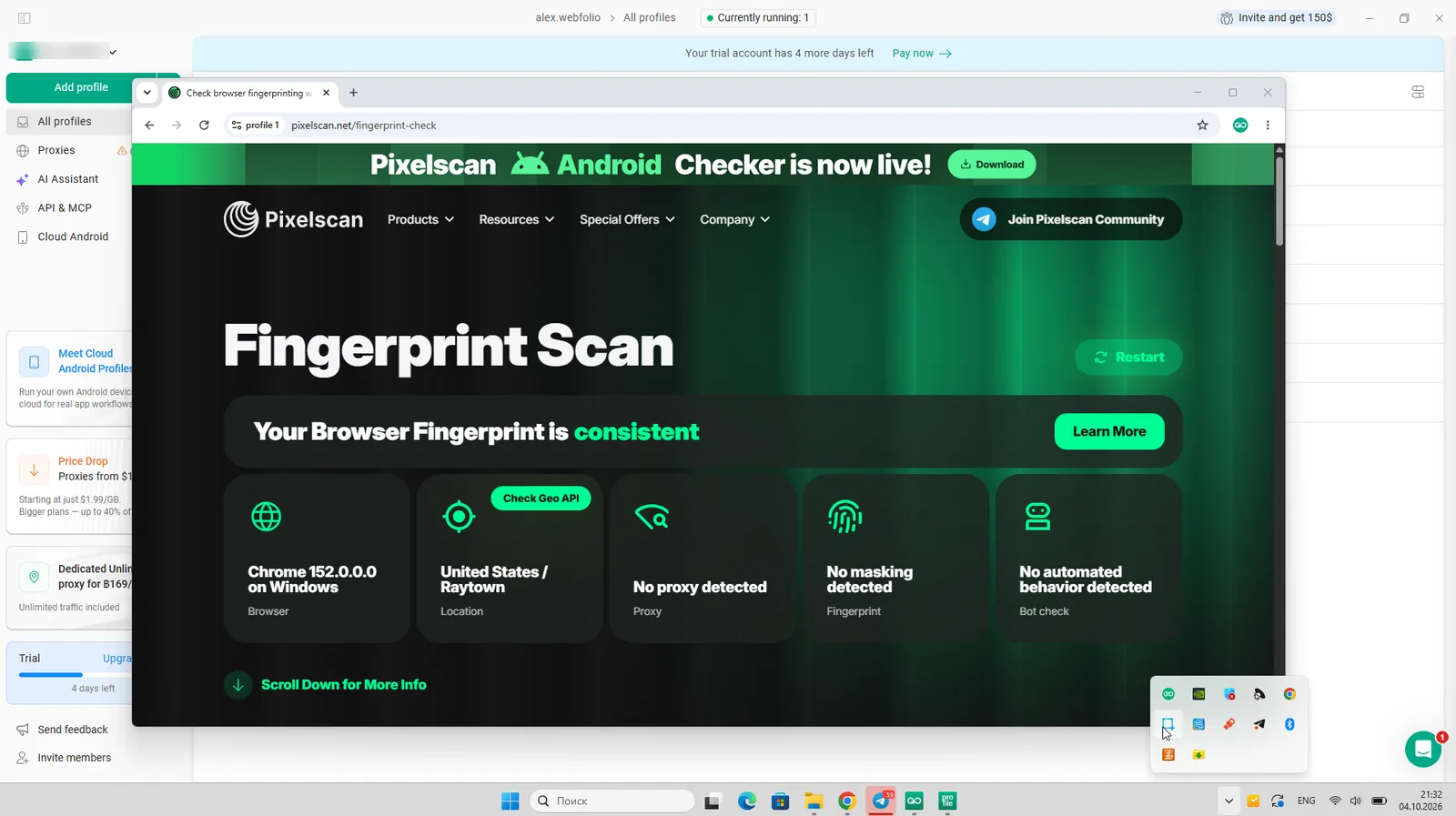
Gologin on Pixelscan: consistent fingerprint, no proxy detected
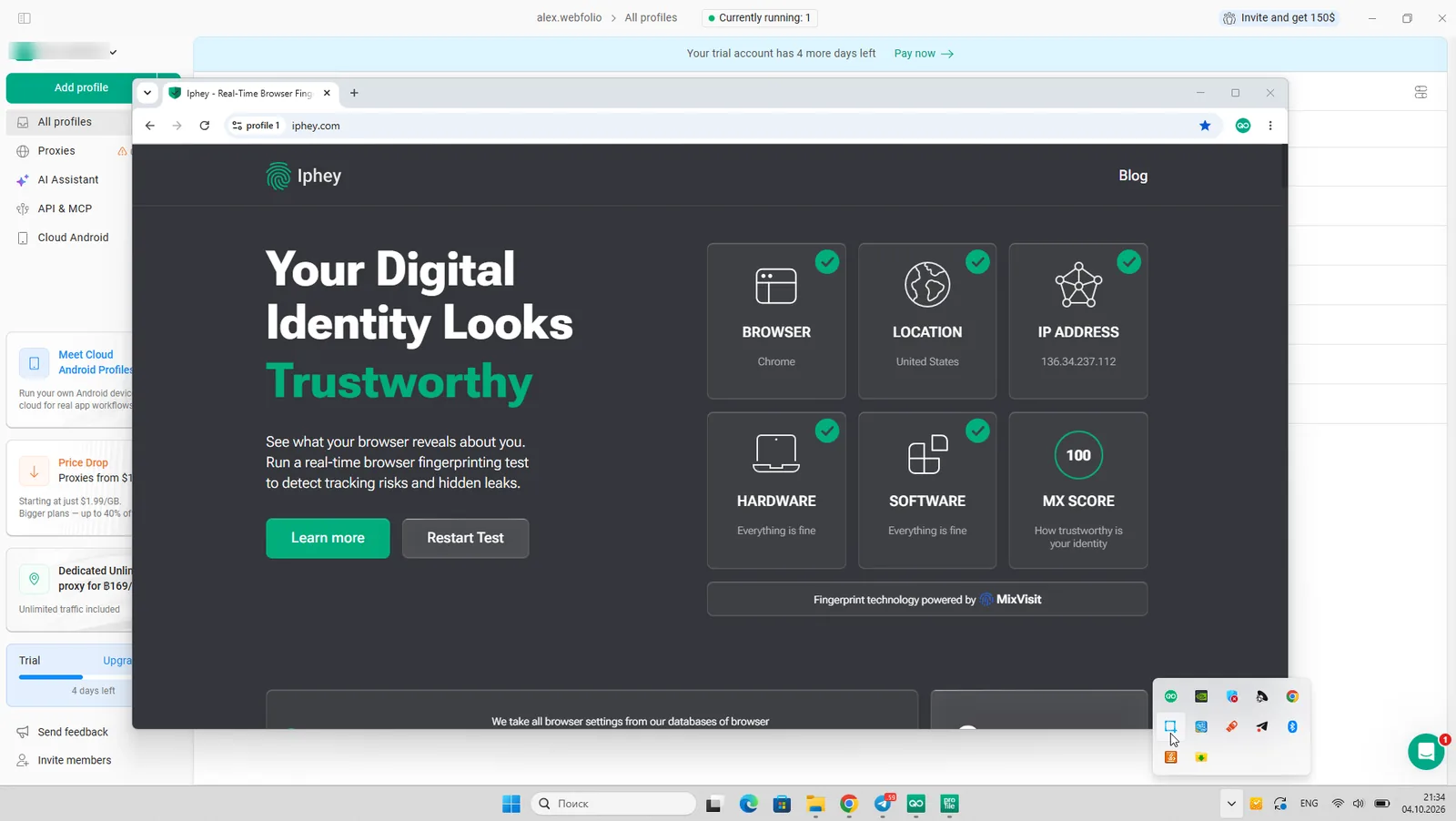
Gologin on Iphey: Trustworthy, MX score 100

Gologin on CreepJS: 0% headless, 0% stealth
A clean result doesn’t make any browser invisible. It means no checker found a leak with these settings on that day. Run your own profile through the checkers with the proxy you’ll actually use.
AdsPower Price
AdsPower has a free plan with 2 profiles, a 7-day trial of all features, and three paid tiers: Professional, Business and Enterprise. Paying quarterly saves 15%; paying yearly saves 40%. Prices are shown in USD, BRL, PLN or VND. Here are the USD prices from AdsPower’s pricing page on October 19, 2026:
| AdsPower plan | Profiles | Monthly | Quarterly (per month) | Yearly (per month) |
|---|---|---|---|---|
| Free | 2 | $0 | — | — |
| Professional | 10 | $9 | $7.65 | $5.40 |
| Professional | 20 | $12 | $10.20 | $7.20 |
| Professional | 50 | $21 | $17.85 | $12.60 |
| Professional | 100 | $36 | $30.60 | $21.60 |
| Business | 200 | $61 | $51.85 | $36.60 |
| Business | 300 | $86 | — | $51.60 |
| Business | 500 | $126 | — | $75.60 |
| Business | 1,000 | $197 | — | $118.20 |
| Business | 2,000 | $297 | — | $178.20 |
| Enterprise | 5,000+ | On request | On request | On request |
Every plan includes one super-administrator. Each extra team member costs $5 a month on monthly billing, or $3 a month on a yearly plan.

AdsPower pricing with yearly billing, October 19, 2026

AdsPower pricing with monthly billing, October 19, 2026
What you get on each tier:
- Free: Chrome and Firefox engines, synchronizer and RPA robot. No Local API, profile sharing, cross-device sync or batch management.
- Professional: everything in Free, plus cross-device sync, batch management, trash recovery, unlimited profile sharing, member permissions and the Local API (300 requests/min).
- Business: the same features with a Local API limit of 900 requests/min.
- Enterprise: customizable RPA workflows and a 1,500 requests/min Local API limit.

AdsPower features by plan, October 19, 2026
What changed since our last review. Earlier this year AdsPower’s yearly discount was 20%. It’s back to 40%, and the quarterly discount is now 15%. Local API limits are higher too: 300, 900 and 1,500 requests a minute, up from 120, 300 and 600.
Gologin Browser
Gologin is the Swiss Army knife of antidetect browsers: it works for any kind of account work, for solo operators and for teams of any size. Here’s what it offers against AdsPower.
Gologin Features and Comfort of Use
Gologin’s strong side is a clean, intuitive interface. Critical settings are automatic, so non-technical users can work safely, while advanced users still get full control over fingerprints. Profile creation, mass proxy import and bulk actions take one or two clicks, and the Mass Actions panel has many options without clutter.
Beyond the browser itself, Gologin includes:
- Built-in residential, mobile and datacenter proxies in 195 countries, with 2 GB of residential traffic a month from Professional 25
- Native apps for Android and iOS (iPhone and iPad, iOS 17 or later) that sync with desktop profiles: start on your computer, continue on your phone. Plus 30 to 120 cloud Android minutes a month on every plan
- Cloud browser launches, profile and folder sharing for teams, and cookie import and export
- A synchronizer, Cookie Bot, REST API, SDKs and an MCP server for AI agents from Professional 100
- Puppeteer, Playwright and Selenium support
Agencies often use Gologin as their shared account workspace: folders, groups and profile shares let a big team organize work without passing passwords around.
Download Gologin for free and manage all your accounts securely in one place. Try for free →
Gologin Support Quality
Support is available 24/7 via live chat, email, Messenger, WhatsApp and Telegram, and chat replies usually come within 5 minutes. A dedicated API developer handles technical questions. Gologin is rated 4.7 on G2 and 4.6 on Capterra.
Gologin Updates Frequency
The Gologin team updates the app and its Orbita engine frequently, and updates install automatically with no extra steps. Users often name stability as their reason for switching to Gologin from alternatives.
Gologin Pricing
Gologin has a free plan with 3 profiles that never expires, a 7-day trial of all features and eight paid plans. Paying yearly halves the price. Prices from Gologin’s pricing page on October 19, 2026:
| Gologin plan | Profiles | Monthly | Yearly (per month) | Proxy traffic | Cloud Android min/mo |
|---|---|---|---|---|---|
| Free | 3 | $0 | $0 | — | — |
| Professional 10 | 10 | $9 | $4.50 | — | 30 |
| Professional 25 | 25 | $19 | $9.50 | 2 GB | 30 |
| Professional 50 | 50 | $29 | $14.50 | 2 GB | 30 |
| Professional 100 | 100 | $39 | $19.50 | 2 GB | 30 |
| Business 300 | 300 | $99 | $49.50 | 2 GB | 60 |
| Business 500 | 500 | $139 | $69.50 | 2 GB | 60 |
| Enterprise | 1,000 | $179 | $89.50 | 2 GB | 120 |
| Custom | 2,000+ | from $279 | from $139.50 | 2 GB | 120 |
Profile shares start on Professional 25. Cloud browser access and cookie import and export start on Professional 50. The synchronizer, Cookie Bot, custom extensions, REST API and MCP server start on Professional 100. Business 500 and above add Cloud Android and AI agentic workflows. Custom adds advanced team management.

Gologin Personal plans with yearly billing, October 19, 2026

Gologin Business plans with yearly billing, October 19, 2026

Gologin Personal plans with monthly billing, October 19, 2026

Gologin Business plans with monthly billing, October 19, 2026
AdsPower vs Gologin: Price for the Same Number of Profiles
The two price ladders don’t line up exactly, so here is the monthly cost for the nearest matching plan:
| Profiles | AdsPower monthly | Gologin monthly | AdsPower yearly (per month) | Gologin yearly (per month) |
|---|---|---|---|---|
| 10 | $9 | $9 | $5.40 | $4.50 |
| 20 / 25 | $12 (20) | $19 (25) | $7.20 (20) | $9.50 (25) |
| 50 | $21 | $29 | $12.60 | $14.50 |
| 100 | $36 | $39 | $21.60 | $19.50 |
| 300 | $86 | $99 | $51.60 | $49.50 |
| 500 | $126 | $139 | $75.60 | $69.50 |
| 1,000 | $197 | $179 | $118.20 | $89.50 |
| 2,000 | $297 | $279 | $178.20 | $139.50 |
The short version:
- Monthly billing: AdsPower is cheaper from 20 to 500 profiles. Gologin is cheaper from 1,000 profiles, and the two cost the same at 10.
- Yearly billing: Gologin is cheaper at 10 profiles and from 100 profiles up. At 1,000 profiles it saves $28.70 a month, or $344 a year. AdsPower is cheaper at 20 to 50 profiles.
- What’s included: Gologin adds 2 GB of residential proxy traffic from 25 profiles and cloud Android minutes on every plan. AdsPower includes the Local API and RPA from its cheapest plan, while Gologin’s API and synchronizer start at 100 profiles.
- Teams: AdsPower charges $5 a month per extra member on monthly billing. Five team members add $25 a month to any AdsPower plan.
AdsPower Pros and Cons
Pros
- No-code RPA, RPA Plus and a synchronizer, with RPA and the synchronizer on every plan including the free one
- Local API from the cheapest paid plan
- Cheaper than Gologin on monthly billing from 20 to 500 profiles
- Frequent updates; Chromium and Firefox engines; fast launches after the first one
- iOS app, cloud phones, an AI agent and MCP access
Cons
- Failed Pixelscan and Iphey on default settings: the timezone didn’t match the proxy
- Still a technical interface, even after the September 2026 redesign
- Only 2 free profiles
- No built-in proxy traffic and no Android app yet
- Extra team members cost $5 a month each
- Trustpilot rating removed for a breach of guidelines; a major security incident in January 2025
Best AdsPower Alternatives in 2026
All of these took part in our October 2026 test:
| Alternative | Result on Pixelscan / Iphey / CreepJS | Paid from | Best for |
|---|---|---|---|
| Gologin | Passed all three | $9/mo, $4.50/mo yearly | Clean fingerprints, low yearly price, Android and iOS apps |
| Octo Browser | Passed all three | €10/mo, €7/mo yearly (3 profiles) | Teams that want the newest Chrome engine |
| Dolphin Anty | Iphey: Unreliable (50) | $10/mo (20 profiles) | Media buying teams |
| MoreLogin | Iphey: Unreliable (90) | $9/mo, $5.40/mo yearly | Budget profiles plus cloud phones |
| GeeLark | Iphey: Unreliable (90) | $9.75/mo yearly | Cloud Android phones for TikTok |
| Multilogin | Iphey: Unreliable (90) | $149/year | Larger teams with enterprise needs |
For free options, see our list of the best free antidetect browsers.
How to Switch from AdsPower to Gologin
- Export cookies from the AdsPower profiles you want to keep, and save your proxy list.
- Download Gologin and create an account. The 7-day trial unlocks every feature, no card required.
- Create profiles in bulk and import the cookies. Cookie import and export is available from Professional 50.
- Paste your proxy list into the Location column, or use Gologin’s built-in proxies. Timezone, language and geolocation are set from each proxy IP.
- Open Pixelscan in one profile to check that the IP and fingerprint match before you log in to your accounts.
Leaving AdsPower? Get 90% off your first Gologin month on any plan: $0.90 for 10 profiles, $3.90 for 100, $17.90 for 1,000. No card needed to claim the code. Get the AdsPower switch offer →
AdsPower vs Gologin: Recap
Work tools for a business need more evaluation than a matter of taste. Here’s a short plan for choosing the browser that fits your needs:
- Count how many browser profiles you need to run now and in six months.
- Decide whether you’ll share profiles with a team or partners, and how many seats that takes.
- Set a monthly budget for the browser and for proxies together.
- Check each tool’s reputation on review platforms, forums and communities.
- Test several browsers on free plans or trials, with the proxies you’ll actually use, and run each profile through Pixelscan, Iphey and CreepJS.
Gologin as AdsPower Alternative: Final Thoughts
AdsPower is a capable tool for people who build automation. RPA, RPA Plus, a synchronizer and an API on cheap plans are its real strengths. It updates often, and on monthly billing it undercuts Gologin for most mid-size setups. But on default settings it failed two of our three fingerprint checks because of a simple timezone mismatch, and its interface still assumes you know what every setting does.
Gologin passed every checker and sets timezone and geo from the proxy automatically. It’s cheaper on yearly plans for 10 profiles and from 100 profiles up, and it includes proxy traffic, cloud Android minutes and mobile apps for Android and iPhone.
The best way to decide is to test both. Gologin has a free plan and a 7-day trial for that.
FAQ
Is AdsPower safe to use?
AdsPower encrypts profile data, states SOC 2 Type II and ISO 27001 certifications, and added stricter login checks after its January 2025 security incident, in which a compromised wallet extension led to user crypto losses. It’s a legitimate tool, but keep wallets in separate profiles, install only trusted extensions and use two-factor login.
Is AdsPower detectable?
In our October 2026 test, AdsPower failed Pixelscan and Iphey on default settings because the profile timezone didn’t match the proxy location. It passed CreepJS’s headless and stealth checks. Setting the timezone to match the proxy by hand fixes the most visible problem.
How much does AdsPower cost in 2026?
AdsPower’s Professional plan costs $9 a month for 10 profiles, or $5.40 a month on a yearly plan. 100 profiles cost $36 a month ($21.60 yearly), and Business starts at $61 a month for 200 profiles. There is a free plan with 2 profiles and a 7-day trial.
Is AdsPower free?
Yes, with limits. The free plan includes 2 profiles, the synchronizer and the RPA robot, but no Local API or profile sharing. A 7-day trial unlocks all features. Gologin’s free plan includes 3 profiles and doesn’t expire.
Is AdsPower better than Gologin?
AdsPower is better if you need no-code RPA or an API on a small, cheap plan. Gologin did better in our fingerprint tests, is easier to use, costs less on yearly plans for 10 and 100+ profiles, and includes proxy traffic and apps for both Android and iPhone.
What is the best AdsPower alternative?
In our test, Gologin and Octo Browser passed all three fingerprint checkers. Gologin is the cheaper of the two and has a free plan; Octo Browser starts with 3 profiles and only a 2-day trial.
Can I download AdsPower for Android?
Not yet. AdsPower has an iOS app for iPhone and says an Android app is coming soon. Android fingerprints are available in desktop profiles, and AdsPower sells cloud phones. Gologin already has native apps for Android and iPhone, both synced with desktop profiles.
Does Gologin have an iPhone app?
Yes. Gologin Browser is free on the App Store for iPhone and iPad and requires iOS 17 or later. It runs isolated browser profiles with their own fingerprints, syncs them with your desktop profiles, and lets you share profiles and proxies with your team. Gologin also has a native Android app, so you can work from either phone. AdsPower currently has an iOS app only.
How do I add a proxy in AdsPower?
Open New Profile → Proxy, choose Custom and select HTTP, HTTPS, SOCKS5 or SSH. Enter the host, port, login and password, or paste them as IP:port:login:password. Click Check proxy, then save the profile. After that, check that the timezone matches the proxy location.
Why is AdsPower’s Trustpilot rating unavailable?
Trustpilot says AdsPower’s rating is unavailable due to a breach of its guidelines, and that it has removed a number of fake reviews for the company. The page still lists 1,080 reviews, but without a TrustScore.
Is there an AdsPower crack or promo code?
Avoid cracked versions: they often contain malware that steals cookies and sessions. AdsPower runs occasional promotions on its site. If you’re moving to Gologin, the AdsPower switch offer takes 90% off your first month.

Read other posts about Reviews of browsers:
- Ghost browser alternative
- Kameleo browser review
- Best virtual browser
- Multilogin chrome browser
- Morelogin browser alternative
- Incogniton vs gologin
- Best proxy browser
- Browserjet review
- Roxybrowser review
- Gologin vs hidemium
- Xlogin review
- Insomniac browser review
- Swspybrowser review
- Yunlark review
- Loginways review
- Nstbrowser review
- Hydraheaders browser review
- Gologin-vs-maskfog review
- Vision-browser review
- Ultimate orb review
- AntBrowser-browser-review
- Vmlogin browser review
- Gologin-vs-identory
- Gologin-vs-switch antidetect
- Antikbrowser review
- Camoufox review
- Geelark review
- Dicloak online browser
- Vmmask antidetect browser
- Hidemyacc browser review
- Rebrowser review
- Session-box-vs gologin
- Multibrowser-review
- Accovod-vs-gologin
- Xbrowser review
- Undetectable browser-vs-gologin
- Bitbrowser-review
- Fingerprintswitcher
- Aezakmi browser review
- Marketerbrowser review
- Genlogin browser review
- Linken-sphere review
- Indigo-browser
- Xpass browser alternative
- Wade browser review
- Surfinite review
- Lalicat-browser review
- Masq-antidetect review
- Octo-browser vs gologin
- Dolphin-anty vs gologin
- Mulogin review
- Aqum-browser review
- Lauth review
- Che browser vs gologin
- Logii review