
Incogniton Browser vs Gologin: Updated Review 2026
Today, as part of our series of comparisons, I will look at a smaller, yet still popular multiple account browser – Incogniton. Originating from Netherlands, this browser often comes up in searches for Incognito mode in Chrome. Don’t mix the names up!
Niche forum users often mention it as a free alternative to all other browsers that manage multiple accounts. However, last time we checked Incogniton had an extremely outdated interface and tons of raw technical settings.
What’s changed in 2026, and has anything been improved? Let’s see!
TLDR: skip to the end for a quick comparison table with all the main points.
| Comparison Criterium | Incogniton | Gologin |
|---|---|---|
| Free plan | ⚠️ (10 profiles for first 2 months only, then drops to 3 — not permanent as the free tier might suggest) | ✅ (3 profiles, permanently) |
| Free trial of paid plans | ❌ | ✅ |
| Features set | ❌ | ✅ |
| Comfort of use | ❌ | ✅ |
| Beginner-friendly | ❌ | ✅ |
| Country of origin | 🇳🇱 | 🇺🇸 |
| Updates frequency | ❌ | ✅ |
| Affordable paid plans | ❌ | ✅ |
| Mobile app | ❌ | ✅ |
| Profile cloud launch | ❌ | ✅ |
| Free in-app proxies | ✅ | ✅ |
| Support quality | ⚠️ (site claims 24/7 live chat, but footer states office hours only via Telegram — unresolved contradiction) | ✅ |
| AI-powered features | ✅ (new: Cas AI assistant on all tiers) | ⚠️ (available as a separate product, not bundled into core plans) |
| Verified fingerprint test results | ❌ (vendor now claims Pixelscan/BrowserLeaks/BrowserScan passes on all tiers — contradicts our own hands-on test failures; unverified) | ✅ |
| Custom plan configurator | ✅ (new: slider-based, 500–5,000 profiles) | ✅ |
Incogniton: what’s new in 2026?
Spoiler: not much. Incogniton team has introduced minor feature changes, but overall improvements are sparse.
At the official website, Incogniton positions itself straight: it’s an antidetect browser. This means if you get to this website, you already know what is and what you want from Incogniton sign up.
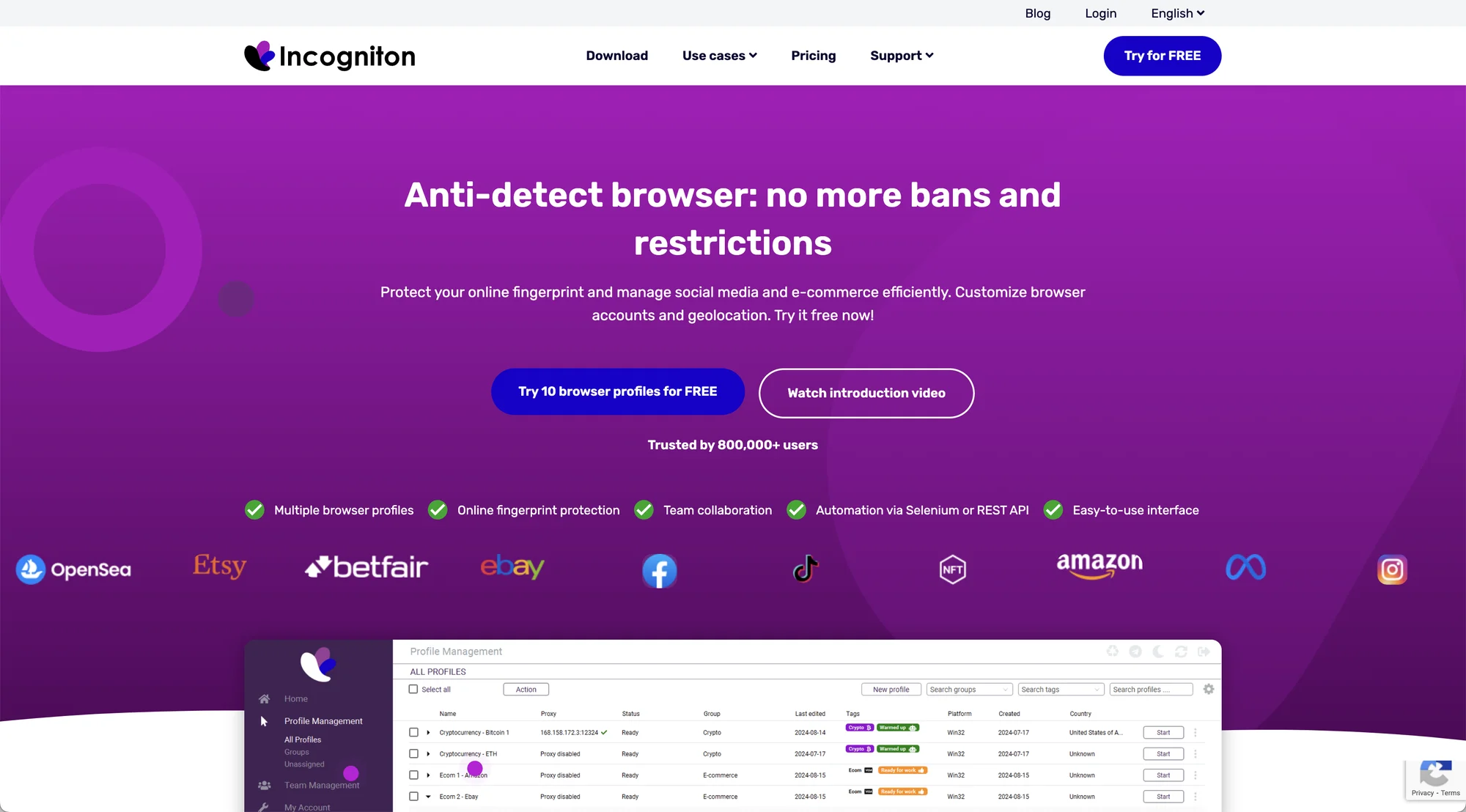 Incogniton website.
Otherwise you won’t get far ahead, and there are a lot of reasons why.
I checked Incogniton from the point of a new user’s view: download and install it, test all features available on the free plan and try to mention important and curious nuances of work that Incogniton offers.
First impressions: Same old
The installation ran smoothly, however the app failed to pass a MacOS verification in a minute after launch. Closing the pop-up helped, but raised more quesitons about the browser safety.
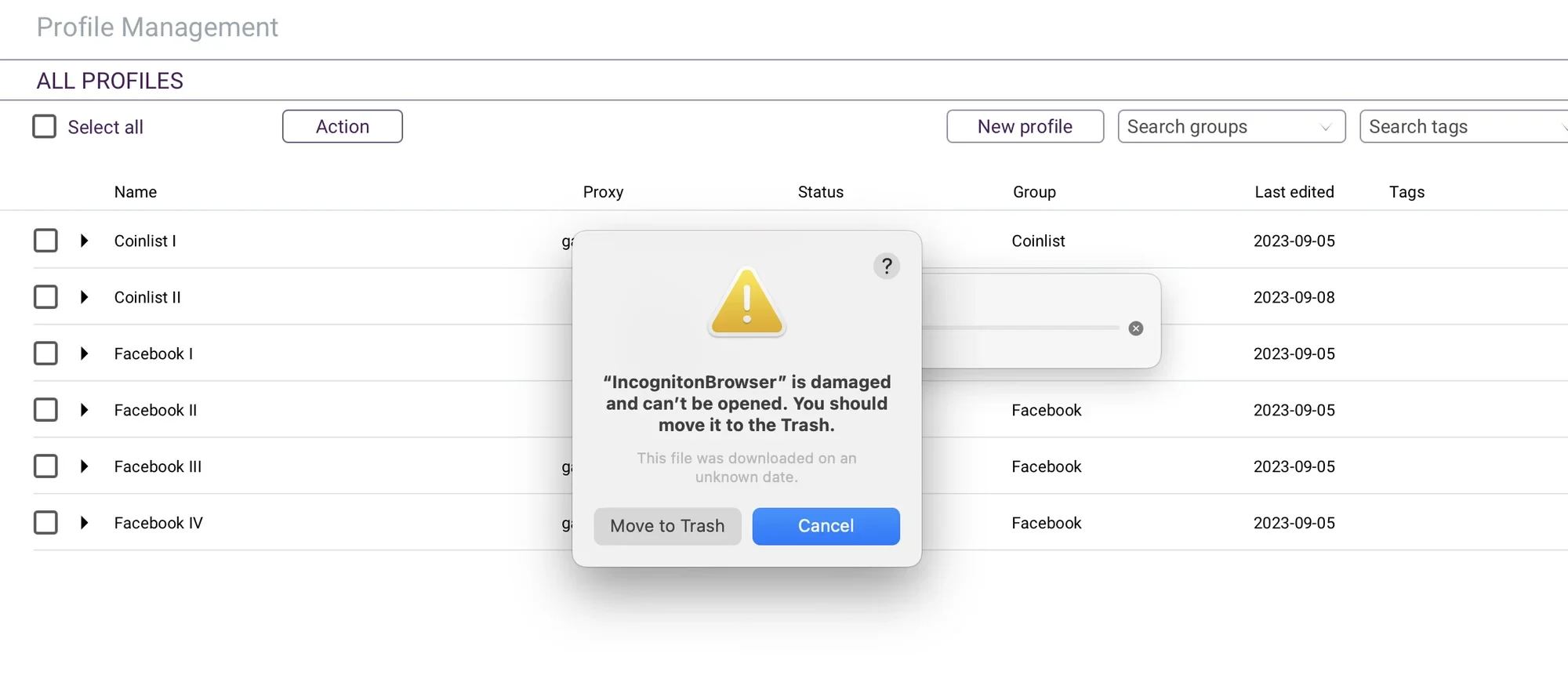 Hardly acceptable for business account management software.
At the first glance, Incogniton is more of an “old school” browser for multiple accounts. It requires a good technical background. I don’t mind the old interface as long as it’s functional and fast – however, Incogniton also gives a feeling of raw software which at its price can’t be tolerated.
The documentation center includes good enough docs and videos. Still, you will need some technical background with Incogniton as it requires a lot of manual adjustments to work. As I said, you’re supposed to know well what you want from the virtual browser profiles.
There are no tooltips for newbies, but you will receive a first run email with initial guides.
Profile creation: Issues still in place
Creating a new profile and setting up proxies in Incogniton is not easy at all. It requires more technical knowledge about fingerprinting than other modern browsers.
I created a few profiles with standard settings, but all of them failed to pass Iphey and Pixelscan checkers on the hardware side. This means problems with the unique digital fingerprint: the most important thing in an antidetect browser.
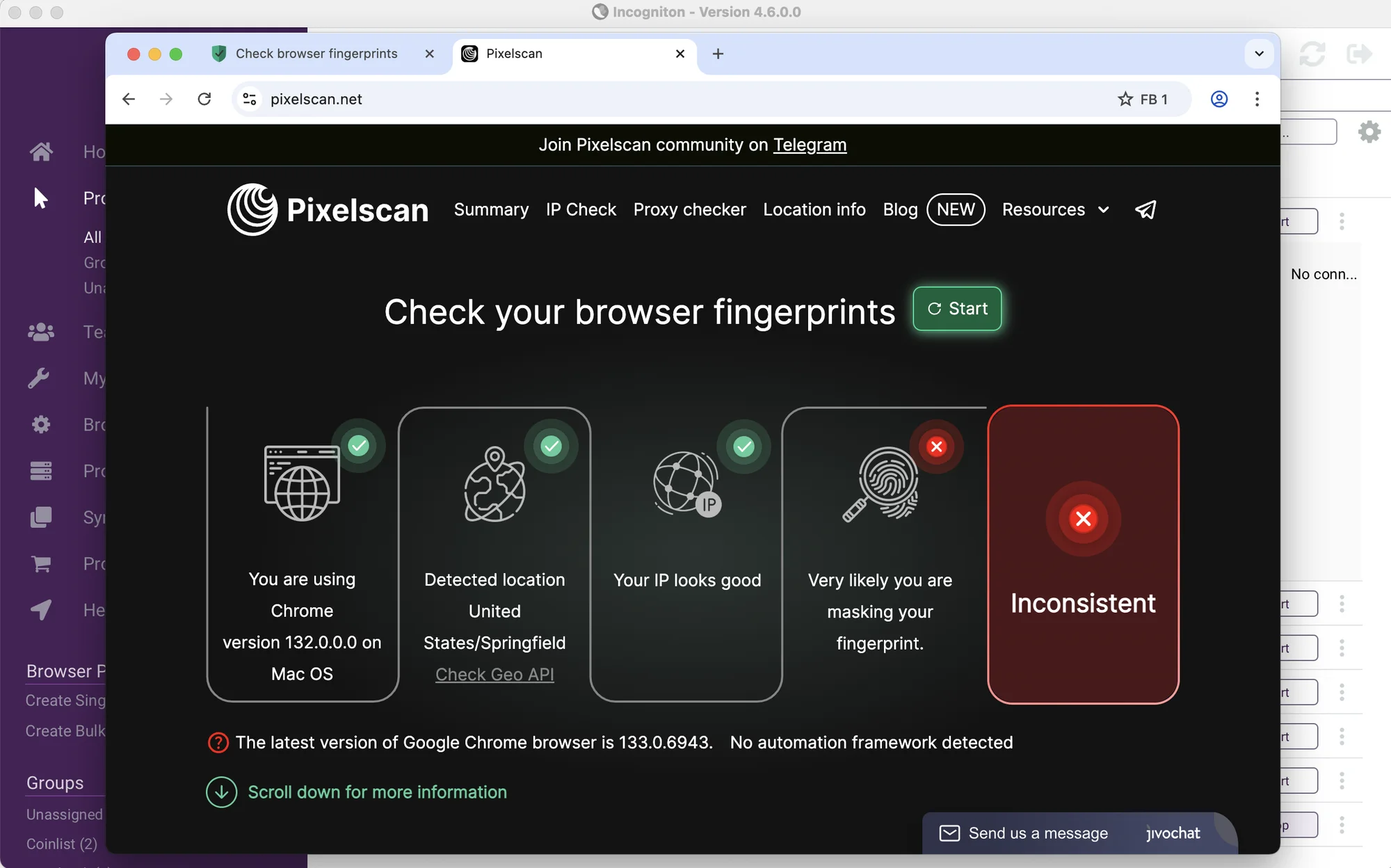
Pixelscan test failed on most important parameters.
Update: Incogniton’s own pricing page now claims all four tiers “pass” Pixelscan, BrowserLeaks, and BrowserScan checks. That’s a direct contradiction of what we found in hands-on testing, where standard profiles failed both Iphey and Pixelscan on the hardware side. Marketing claims and actual behavior don’t always match, so we’d recommend re-testing a fresh profile before taking this at face value, our results may be outdated, or the claim may simply be aspirational.
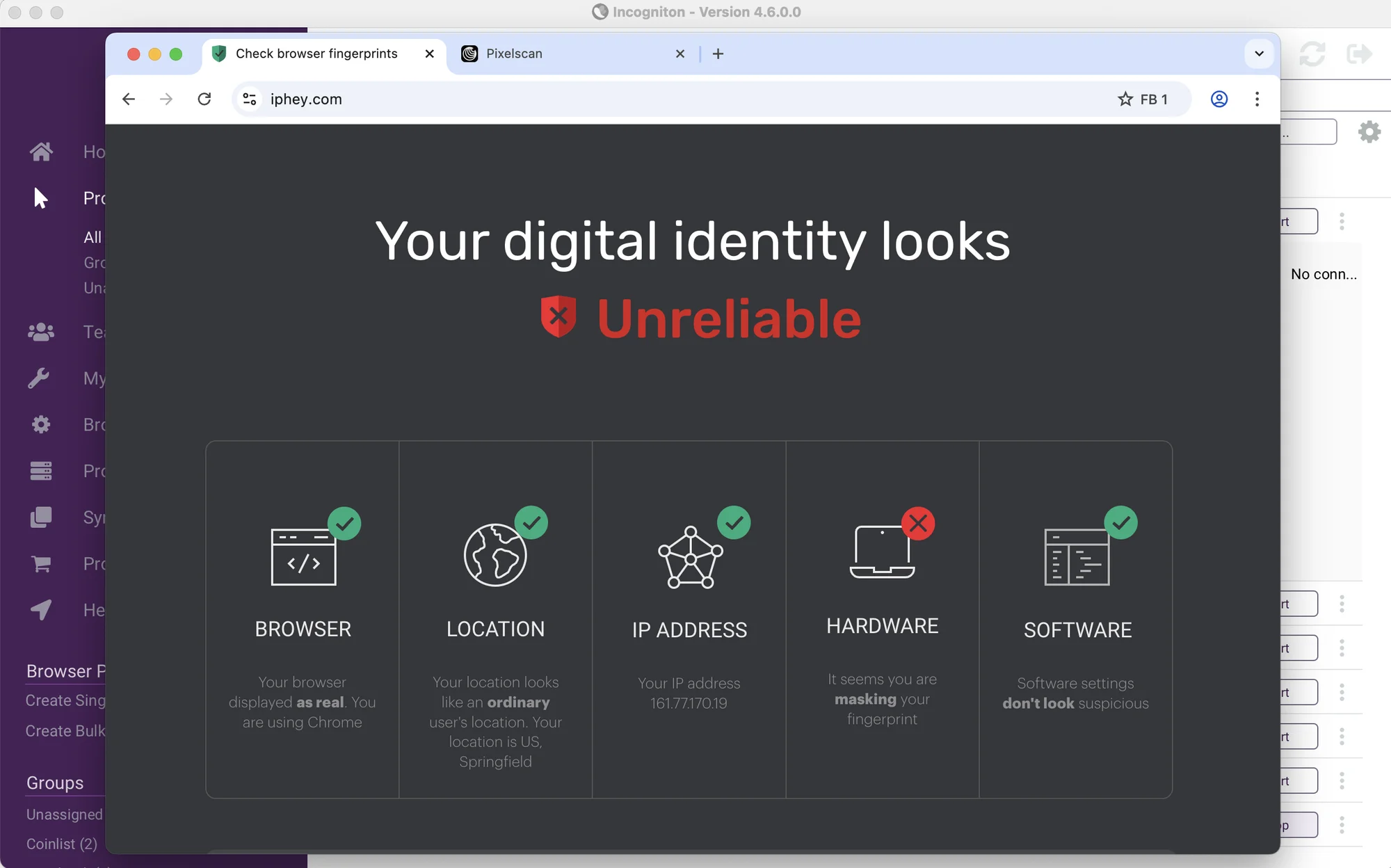 Iphey.com failed on Hardware as well. A standard Quick profile with default settings and matching OS was used: maybe that’s the reason.
I know these checkers can be passed in Incogniton, but it requires a lot of adjustments, tech skill, and most important – desire to dive into settings.
Profiles launch and stop with an OK speed, including the mass launch option. I haven’t met any lags or bugs with the profile launcher during our tests – at least on the free plan with 6 profiles.
On the whole, in 2026 Incogniton’s interface hasn’t changed a bit. It’s still outdated and too technical (especially on the proxy side). It’s usable, but leaves an impression of an old suspicious piece of software for tech-savvy enthusiasts.
Comfort of use & Features
If you’re a more technical person or simply suffer from nostalgia, Incogniton antidetect browser might be an adequate free option for you, once you learn the basics of its interface. The table of profiles can be customized.
Incogniton browser is adapted relatively well for mass profile actions and working with larger amounts of profiles. The amount of mass actions is quite extensive.
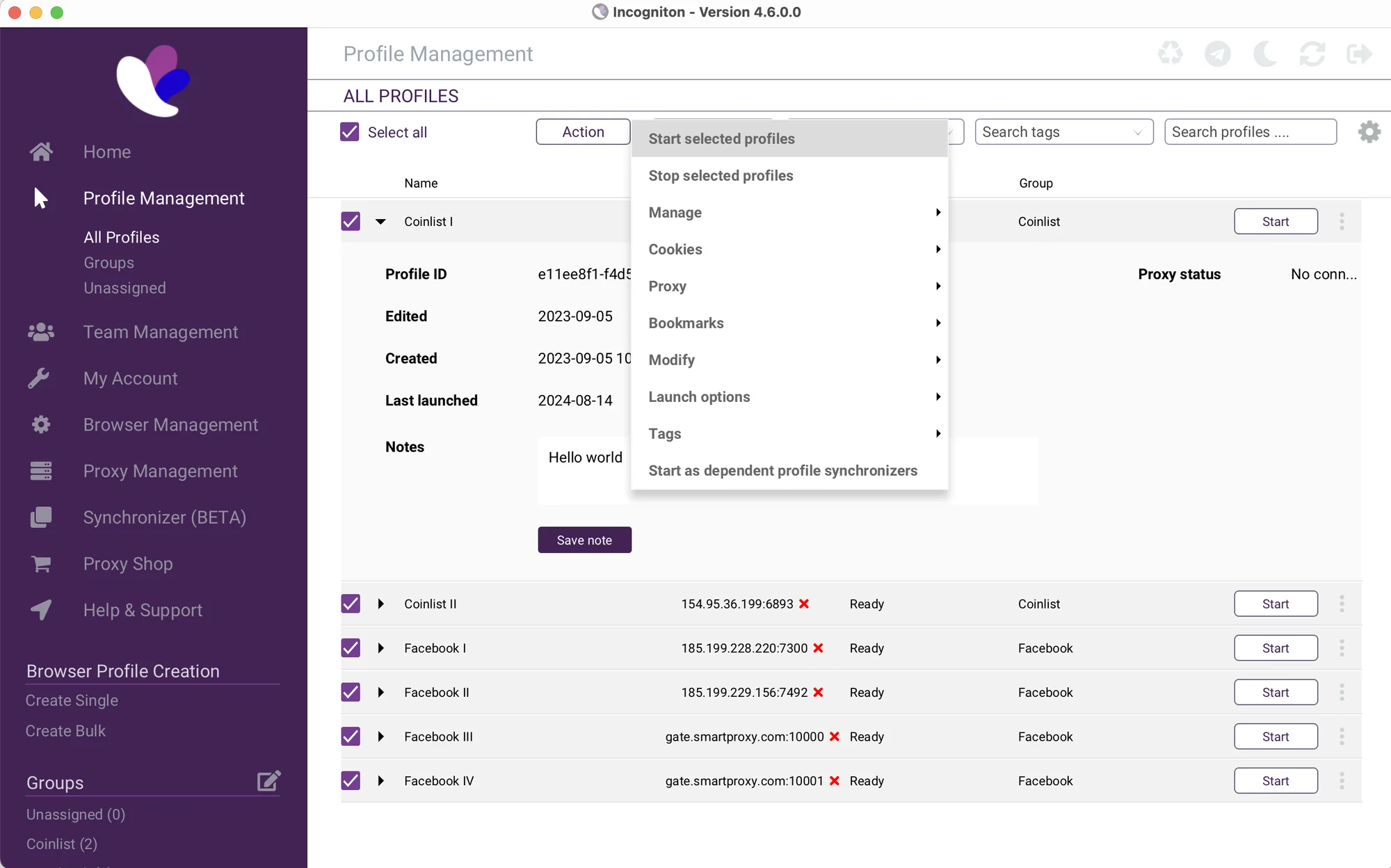 Just as before, Incogniton is a usable app, but feels outdated, raw and too technical.
Multiple browser profiles can be grouped into Folders with adequate team permission options.
Like most browsers, Incogniton offers managing extensions and bookmarks. However, it’s done through a very dazzling interface by 2026 standards. Bookmark URLs don’t auto-wrap: you can’t simply write address.com without the https prefix.
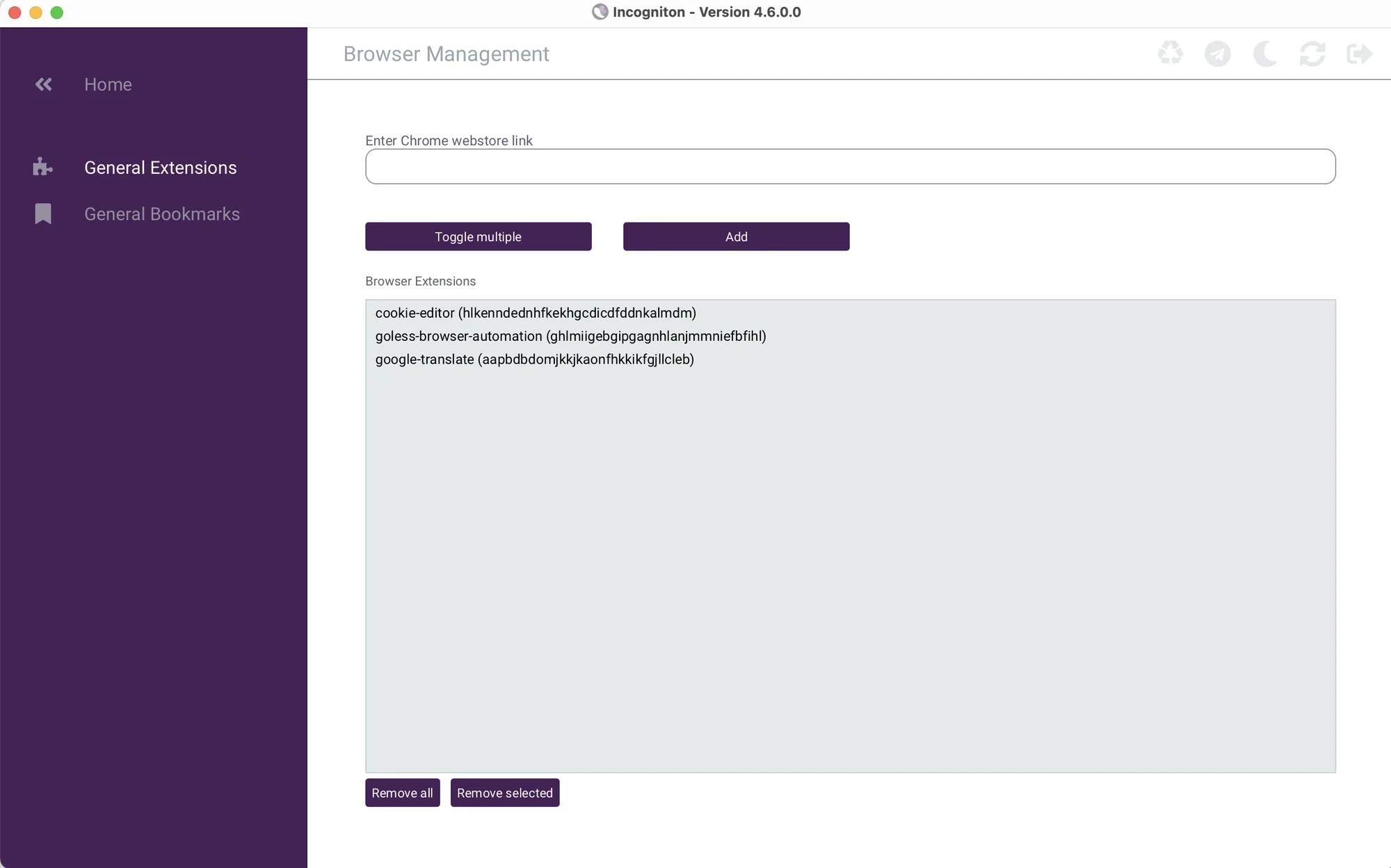 To add an extension, I had to find its Chrome Web Store URL in my browser (!) and then manually copy it into Incogniton.
Also, Synchronizer feature has been rolled out some time ago, however it still doesn’t work on MacOS – made for Windows only. It made me think Incogniton is not that popular among MacOS users, so the team decided to not build this feature for them.
Worth knowing before you pick a plan: several features are gated well above the entry tier. REST API access and Selenium/Puppeteer automation only unlock from the Entrepreneur plan up Starter Plus doesn’t include either. The same goes for Cookie Collector, the Synchronizer, profile transfers, cookie export, and restoring deleted profiles. A dedicated team dashboard with user roles only appears from Professional and up. If automation or team management is part of your workflow, the $19.99 Starter Plus plan won’t cover it — budget for at least Entrepreneur.
New in 2026
Incogniton has added a built-in Cas AI assistant, available across every tier including the free one. There’s also new Widevine (DRM) support, letting profiles play protected streaming content that would otherwise be blocked, and a “Paste as human typing” feature that simulates manual keystrokes when pasting text, a small anti-detection touch aimed at defeating typing-pattern analysis. None of these existed in our original testing.
Mobile devices and fingerprints
This is yet another area where Incogniton is far behind. Remote access from different devices is a complete necessity in 2024. Unlike Gologin, Incogniton offers no mobile or web version for remote work. This is a serious limitation: many alternative browsers offer mobile apps.
Incogniton also does not offer any mobile fingerprints. Only Windows and MacOS operating systems are available. This might be critical if you work with mobile platform ads.
Proxy Integration
From my experience, proxy management is by far the most difficult to use section of an antidetect browser, for example AdsPower.
Incogniton is a great example: adding, assigning and checking a single proxy IP takes an absolute ton of time.
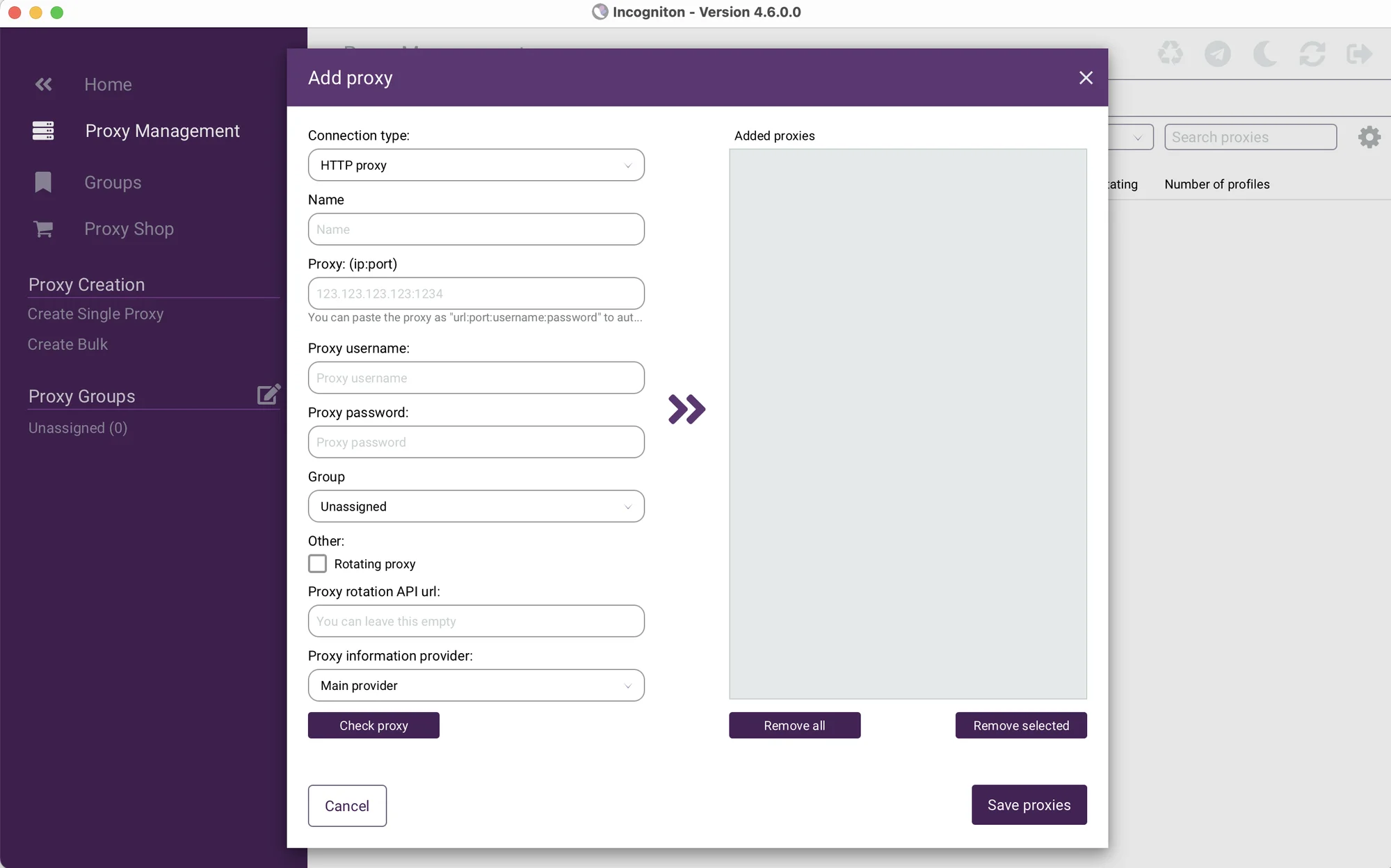
There are two integrated proxy providers supposed to work through API keys. Proxy traffic is not included in paid plans.
To my opinion, it’s all too much even for an experienced user, let alone a new one. All this leaves Incogniton only for experienced enthusiasts.
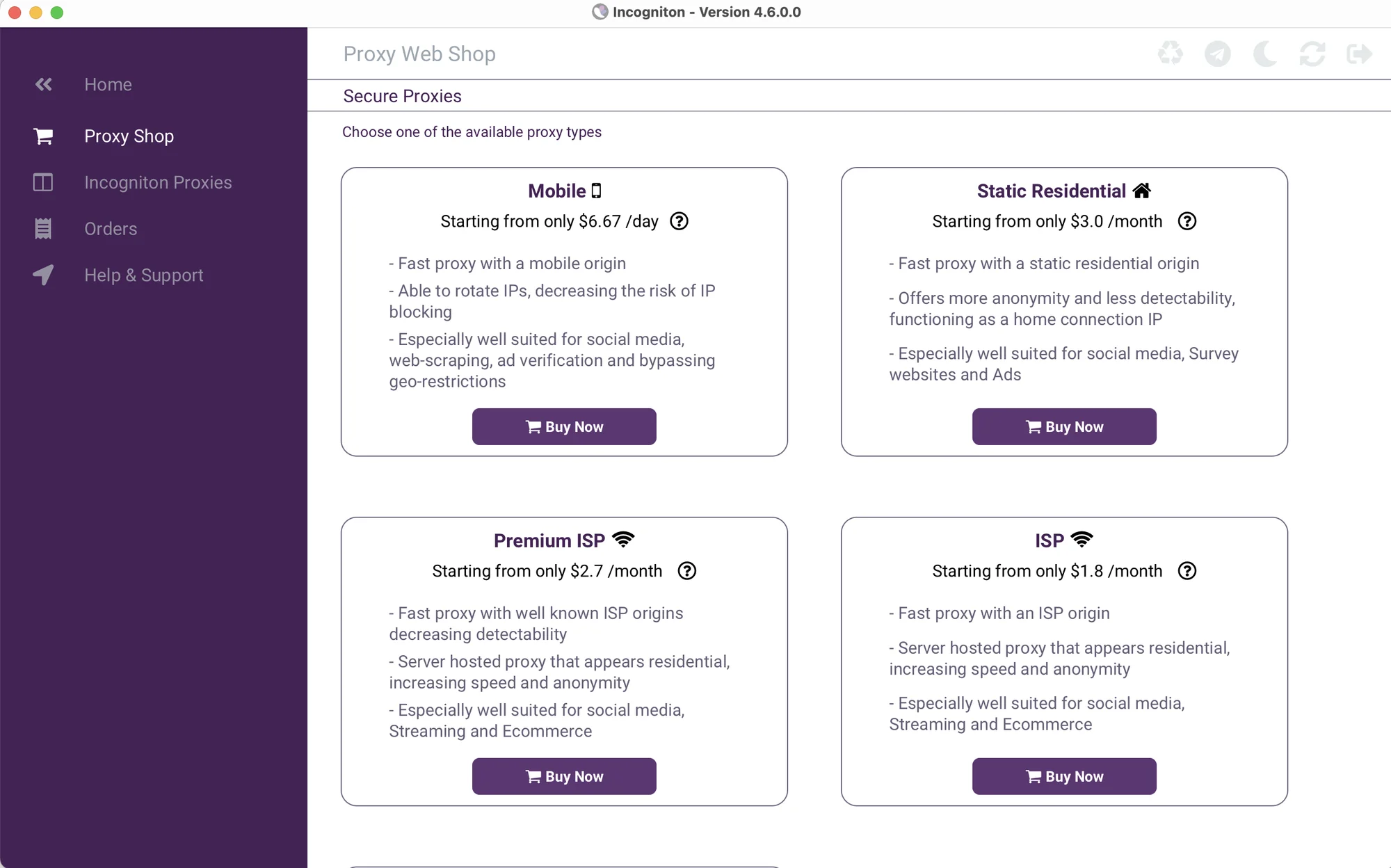 A Proxy shop is present where you can buy different types of proxy IPs, including Mobile, ISP and Static Residential.
Incogniton now offers a free proxy, which is a great addition to the free plan.
Support and updates
Another mixed up moment with Incogniton is the updates frequency. The team still posts updates on their Telegram channels, and it’s not quite clear if they are frequent enough.
The support works on Telegram and e-mail only. I should note I received an answer on Telegram very quickly, although it didn’t quite solve our case. Also, we haven’t been able to find any user community: there are only Telegram channels led by the team.
I should also mention Incogniton has recently had a user data leak a couple years ago. Users lost funds from their crypto accounts managed via Incogniton login after a malware attack. I haven’t seen any messages about compensations from the team.
At Gologin, we advise you to change passwords frequently and always use 2FA operating sensitive data or crypto accounts.
A discrepancy worth flagging: Incogniton’s pricing page advertises “24/7 support · Live chat & email” directly beneath its plan cards. Yet the same site’s footer states the company is “available during office hours (CET) on Telegram,” and is based in Amsterdam.
We couldn’t reconcile these two claims on the same site, if guaranteed 24/7 coverage matters for your use case, we’d suggest confirming directly with their support team rather than trusting either claim outright.
Payment options have become more specific since our last check: alongside Visa, Mastercard, American Express, and PayPal, Incogniton now accepts Bitcoin, Ethereum, Litecoin, Dogecoin, and Dai via Coinbase, plus iDEAL, a Dutch payment method that fits the company’s Netherlands base. Stripe now also appears as a processing option.

Gologin – best alternative to Incogniton Browser
Compared to tech-savvy and outdated Incogniton, Gologin seems straight-up superior in both functionality, interface and pricing. It leaves an impression of a well-maintained and safe software. Under the simple, minimal interface Gologin offers powerful all-round functionality.
Gologin is well suited for both solo use and professional teams of any size due to its affordable prices and advanced features.
Let’s compare Incogniton to Gologin, and at the end take a look at prices and rates.
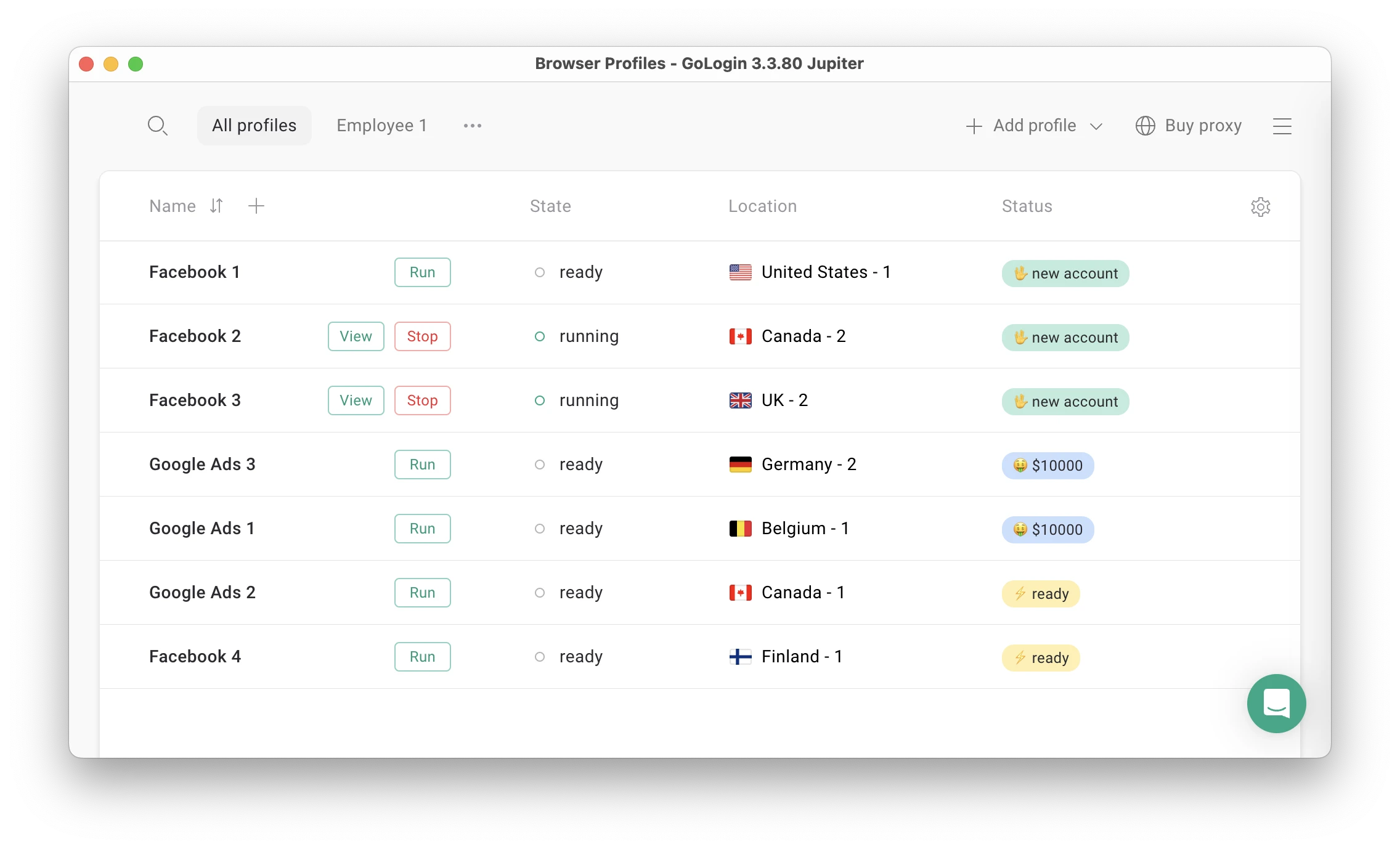 Gologin main screen.
Features and comfort of use: what’s changed in 2026
Over the last year Gologin has become even more optimized for new, non-technical users. Both new profile and proxy creation take only one click each.
A new user can now literally begin work in seconds. Gologin is a massive time saver compared to most alternatives.
Unlike Incogniton, Gologin has:
- Clean UI suitable for non-technical people
- 99,9% uptime over 2022-2025 with no user data leaks
- One-click profile and proxy creation
- 2Gb proxies in all paid plans
- Frequent updates of the app maintaining safe work
- Android app + Web version with cloud-based profile management
- Free 7-day trial of all paid features.
Gologin users are able to launch profiles remotely on a safe cloud server. This is extremely comfortable for slower machines and remote access as it can be used from any device.Thanks to a more modern interface and simplicity, Gologin is often used as a team database for agencies. Even an enterprise sized team can be organized here without problems.
Support quality & Reviews
The support team quickly responds to all user requests and tries to help in any situation. Gologin managers often collect customer feedback and suggestions directly from the users, making browser updates as relevant as possible.
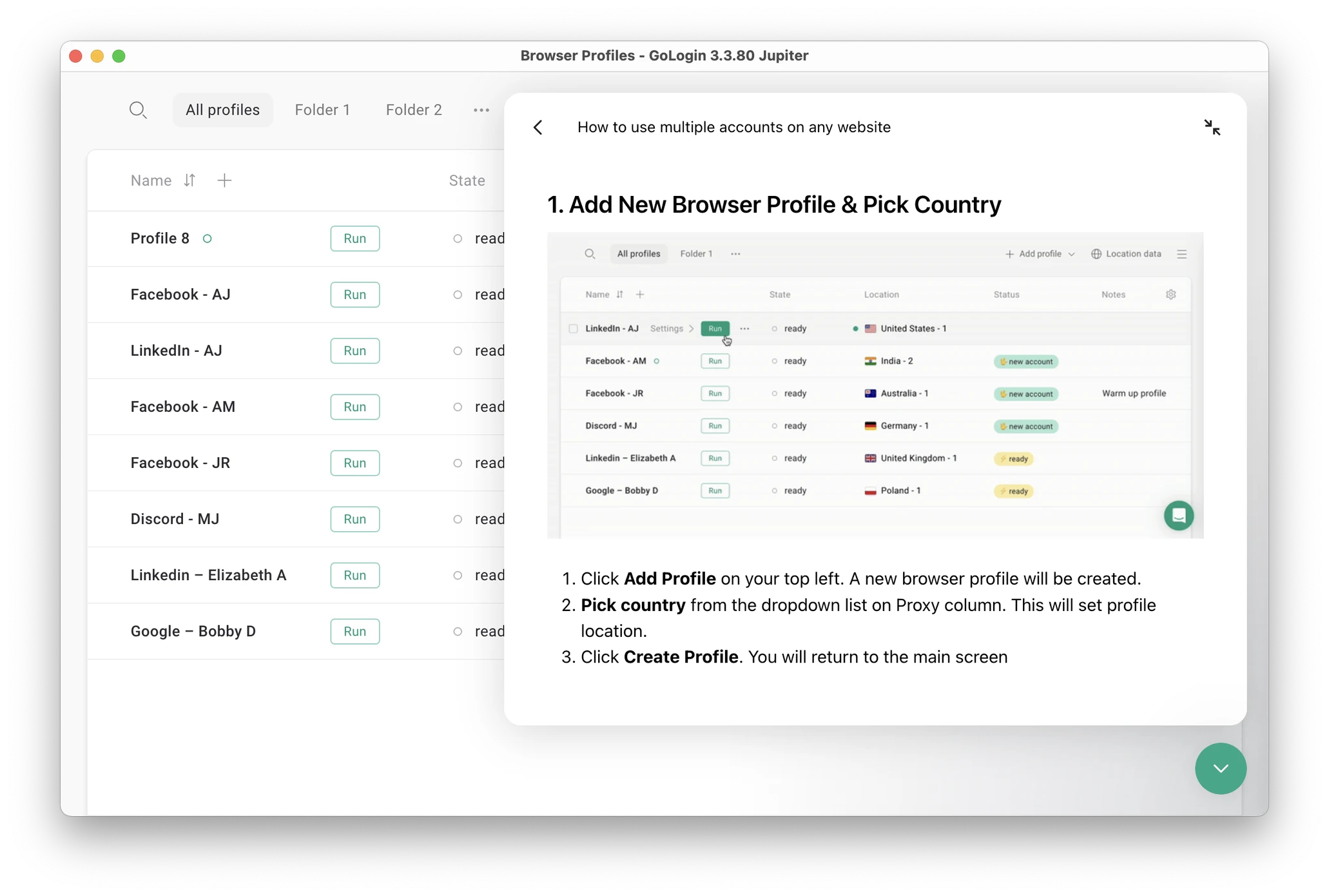 The live chat has guides and docs on using Gologin.
Users ofter say their problems were solved by chatting with Gologin team or through browser updates that happen quite often.
Proxy integration
Gologin now offers built-in proxies with a seamless in-app workflow. 2Gb of traffic already included in all paid plans.
All you need to do is create a new profile with + icon, click on Location and choose your country. That’s it! Your profile is ready to work.
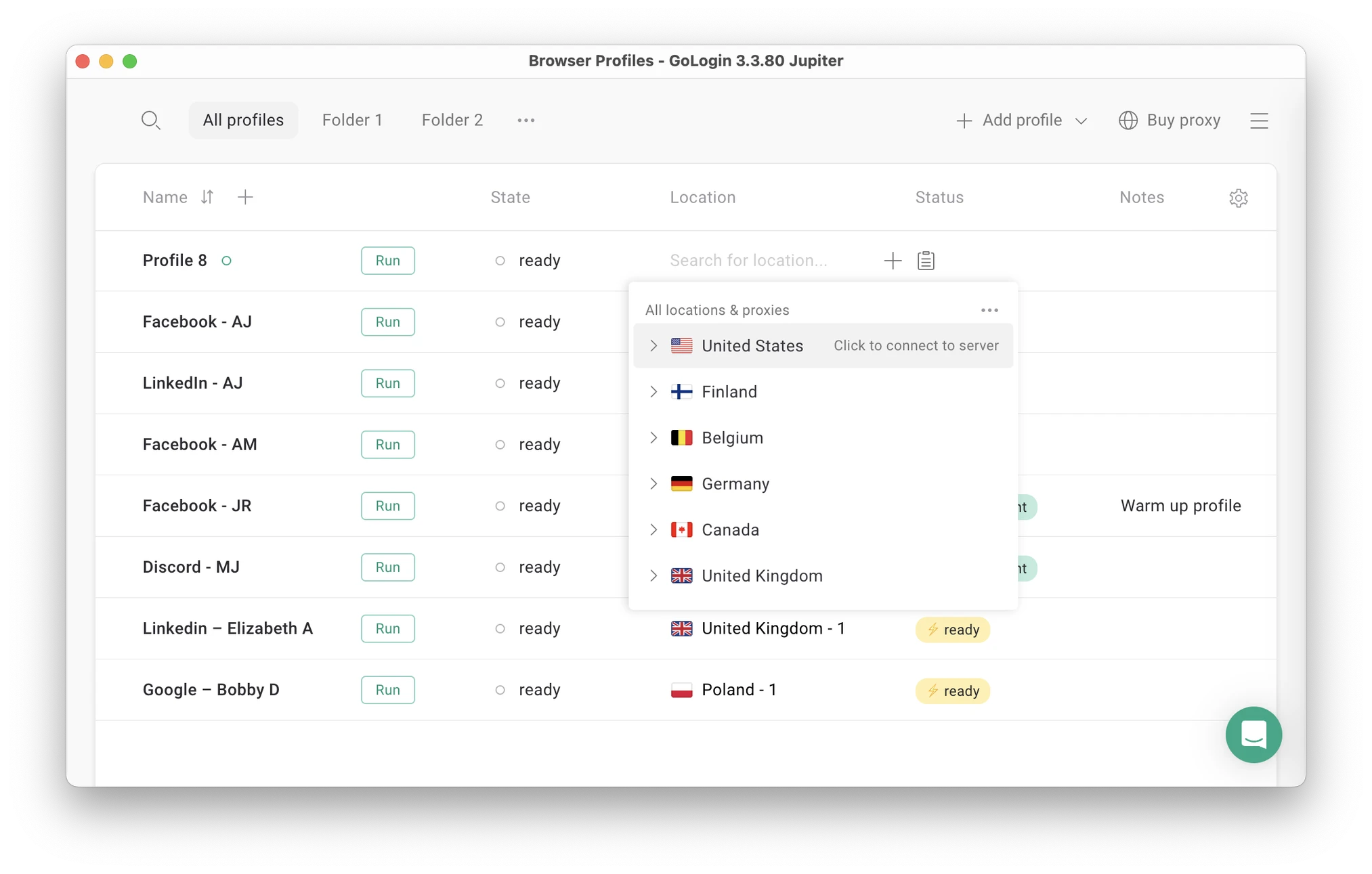 You can now create a profile and assign a proxy in seconds – one click for each action.
Mobile proxies are also available for purchase, all backed by a top class USA proxy provider with a 99,99% uptime. Topping up the balance is also seamless and works with Stripe.
Updates frequency
Compared to Incogniton, Gologin team updates the browser quite frequently. It is a well-maintained software. The team answers on Live chat in under 5 minutes and does everything necessary to keep user data safe and take user needs into account. Updates are automatic: you just need to restart the browser.
Clients often praise Gologin for the stable profile work in 24/7 mode without downtime. The stability factor is often the reason why users move from Incogniton and other alternatives to Gologin.
Let’s move on to the final part of the comparison: plans and pricing.
Incogniton vs Gologin – Pricing
Free plans and trial periods
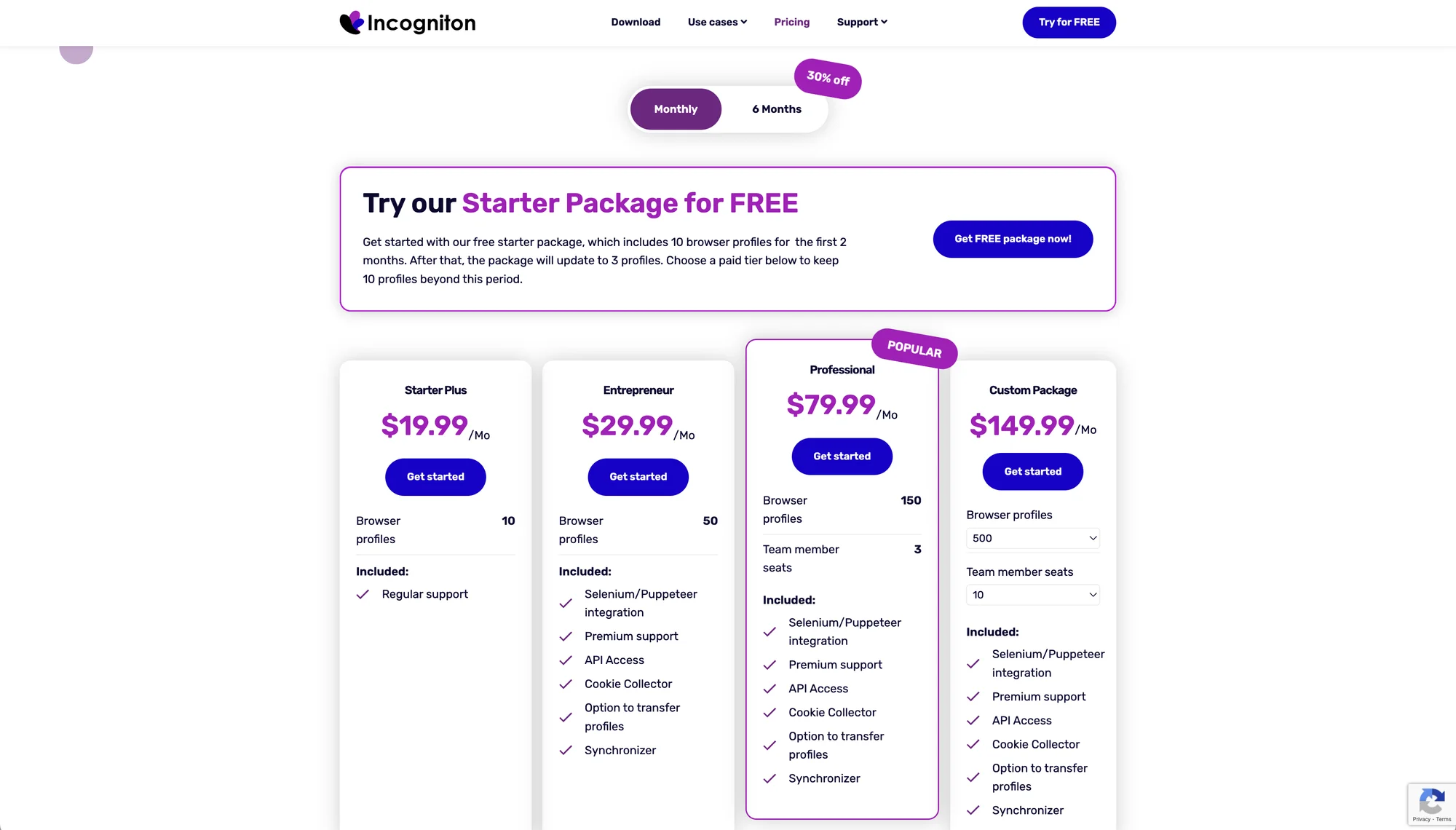
Both Incogniton and Gologin offer forever free plans, but Incogniton’s is more conditional than it first appears. Its free Starter package includes 10 browser profiles only for the first two months after that, it automatically downgrades to 3 profiles unless you upgrade to a paid tier. Several features are also withheld from the free version entirely: Cookie Collector, Synchronizer, profile transfers, cookie export, REST API/Selenium automation, and restoring deleted profiles.
Gologin offers 3 profiles on the Forever Free plan permanently, with no countdown, plus a free trial of all paid features for 7 days with no restrictions.
Paid plans
Incogniton’s core tier pricing hasn’t changed: Starter Plus ($19.99/mo, 10 profiles), Entrepreneur ($29.99/mo, 50 profiles), Professional ($79.99/mo, 150 profiles, 3 seats), and Custom (from $149.99/mo, 500+ profiles), now with a slider-based configurator for custom profile/seat combinations above that.
One correction to our previous math: Incogniton actually separates its long-term discounts into 30% off for 6-month billing and a deeper 40% off for annual billing two different rates, not one. Recalculating with the correct annual rate, a year of the Entrepreneur plan (50 profiles) comes to roughly $216, not the $252 we’d calculated using the 6-month rate.
A comparable Gologin plan (Professional, 100 profiles) now costs $9/month, or $4.50/month billed annually, using Gologin’s flat 50% annual discount. At $54/year for double the profile count, Gologin remains meaningfully cheaper even against Incogniton’s corrected 40% annual rate.
Team plans: Incogniton’s Professional plan (150 profiles, 3 seats) costs $79.99/month; Gologin’s Business plan (300 profiles) costs $119/month with team members added individually. Incogniton’s Custom package (500 profiles, 10 seats) costs $149.99/month; Gologin’s Enterprise plan (1,000 profiles, fixed) costs $299/month, double the profiles at roughly double the price, keeping the per-profile cost close to identical once seats are factored in similarly.
Personal use
There is a new paid plan called Starter offering 10 profiles for $19,99 a month without VAT. It’s basically same old Free plan with same limitations, only now for $2 per profile. Add proxies on top, and it becomes too expensive to even consider.
The first paid plan worth attention (Entrepreneur, 50 profiles) costs $29,99 a month. When you add it to cart, it’s already $35,99: VAT is not included in the Pricing page. That’s not very transparent for an already suspicious software.
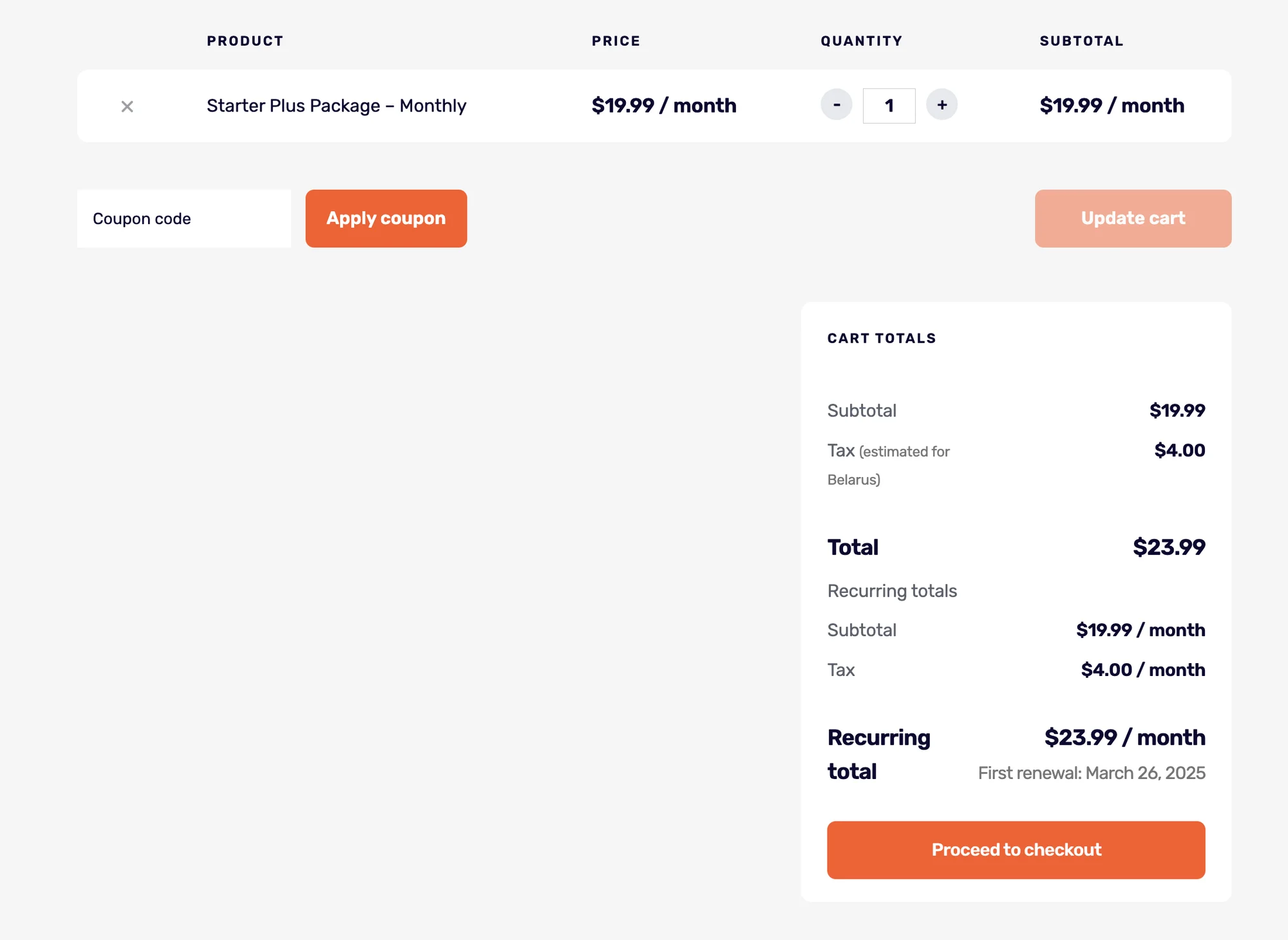 VAT counts in on purchase stage.
Incogniton team offers an option to evade paying the VAT for non-EU businesses. I will mention both prices for a fair comparison.
Incogniton’s prices do not include VAT. Read the fine print and prepare to pay extra when making calculations.A similar Gologin plan (Professional, 100 profiles) costs $49 per month – no extra.
Gologin comes out half the price if you consider the per profile price. Gologin offers more for the money, and also gives a week of free trial for testing.
Incogniton offers a long-term discount: you can get a 30% discount if you pay for 6 months. Gologin offers a discount only for a yearly payment, but offers a generous 50% discount.
A year of 50 profiles use will cost $252 on Incogniton, while 100 profiles on Gologin will cost $294. The per profile price is twice as low.
Gologin pricing plans allow to buy extras with no limitations.

Team plans
Incogniton team plans – Professional and Custom – contain 150 and 500 profiles. These are claimed to cost $79,99 and $149,99 per month without VAT.
Let’s count the VAT in: that’s $95,99 for Professional and $179,99 for Custom per month. These plans include 3 and 10 team seats respectively.
Gologin comes even cheaper here, offering more seats and more profiles for the teams. Business and Enterprise (300 and 1,000 profiles with 10 and 20 team seats) will cost you $99 and $199. Gologin ends up costing twice cheaper again, even without the yearly discount.
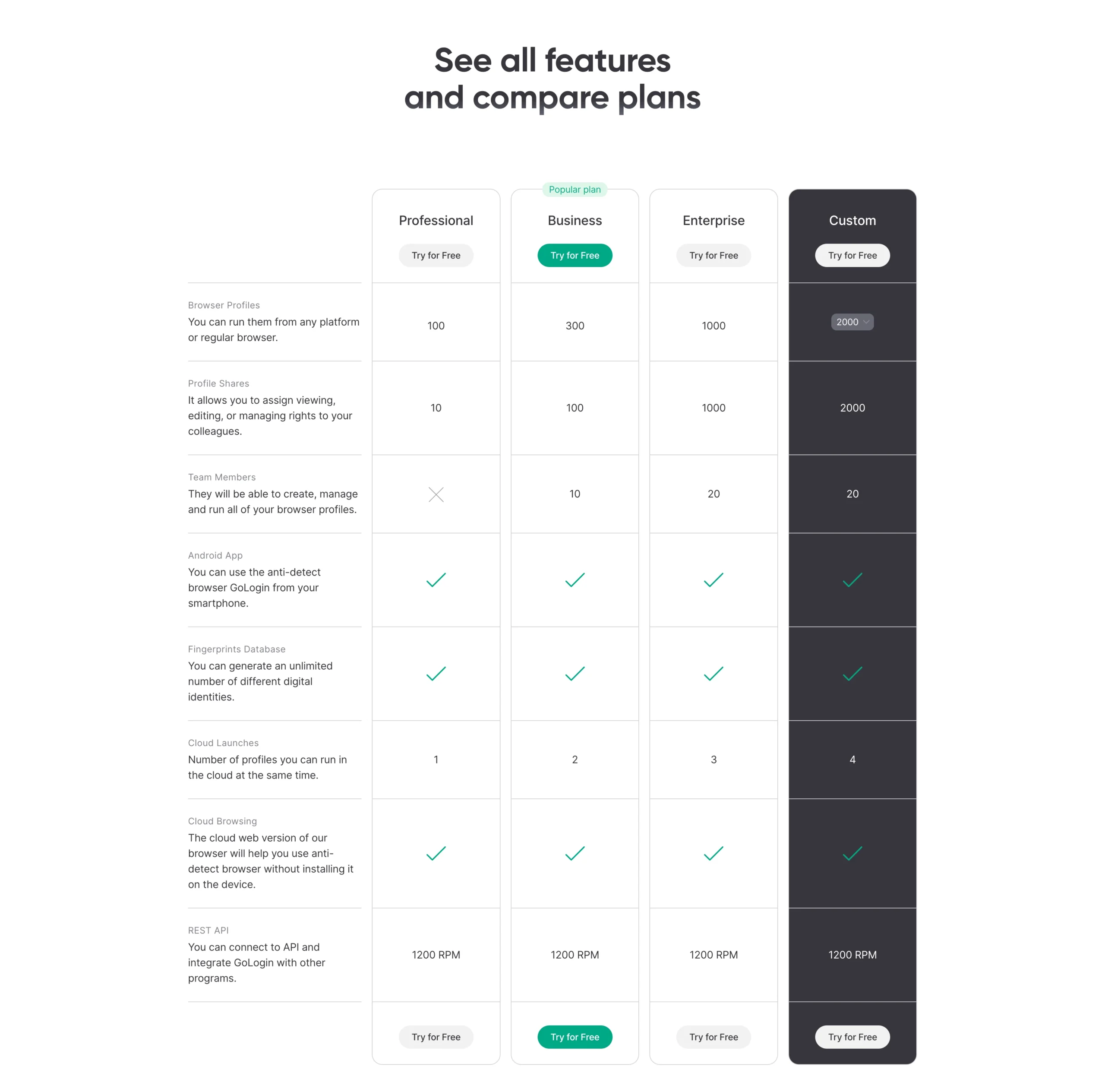 Gologin plans and features.
Things have not changed in 2026: Gologin still has a better price-quality rate. Evaluate your company’s budget and consider how much you’re willing to pay for the software.
If you are already working with Incogniton, simply replace it with Gologin. Try it out on the free test period and evaluate how many accounts survive in the first and the second browser. This is the parameter that most often reflects how expensive is the browser for your work.
Incogniton vs Gologin: Verdict
As I mentioned before, almost nothing changed in Incogniton over last year. The browser is not too expensive and has a good feature set for a free plan, but still feels raw and suspicious for a paid software.
Gologin, on the other side, has improved much. It is now even easier for a new user to begin work with multiple accounts with no technical hassle.
I have prepared some questions to help you choose the best anti detect for your situation:
- How many browser profiles do you need?
- Do you need to share profiles with partners?
- How much are you willing to pay for a program to work?
- Does the browser have a good reputation? What do reviews and forums say about it?
- Can you test the browser for free? If yes, which one suits you best?
FAQ
Is Incogniton free?
Yes. Incogniton has a free Starter plan: 10 profiles for the first 2 months, then it downgrades to 3 profiles free if you don’t upgrade. Paid tiers are available.
How to get incognito for free?
-
Incogniton app: Download from the website and select the free Starter plan.
-
Browser “Incognito/Private” mode: It’s built into Chrome, Edge, Firefox, Safari—no cost.
How to incognito on Android?
Chrome app → ⋮ → New Incognito tab. (Similar in Firefox: ⋮ → New Private Tab; Samsung Internet: ≡ → New Secret mode tab.)
How do I open an Incognito browser?
-
Chrome / Edge: Ctrl + Shift + N (Mac: ⌘ + Shift + N).
-
Firefox: Ctrl + Shift + P (Mac: ⌘ + Shift + P) for a Private Window.
-
Safari (Mac): ⌘ + Shift + N for a Private Window.
Read other posts about Reviews of browsers:
- Kameleo browser review
- Best virtual browser
- Multilogin chrome browser
- Adspower browser vs gologin
- Morelogin browser alternative
- Best proxy browser
- Browserjet review
- Roxybrowser review
- Gologin vs hidemium
- Xlogin review
- Insomniac browser review
- Swspybrowser review
- Yunlark review
- Loginways review
- Nstbrowser review
- Hydraheaders browser review
- Gologin-vs-maskfog review
- Vision-browser review
- Ultimate orb review
- AntBrowser-browser-review
- Vmlogin browser review
- Gologin-vs-identory
- Gologin-vs-switch antidetect
- Antikbrowser review
- Camoufox review
- Geelark review
- Dicloak online browser
- Vmmask antidetect browser
- Hidemyacc browser review
- Rebrowser review
- Session-box-vs gologin
- Multibrowser-review
- Accovod-vs-gologin
- Xbrowser review
- Undetectable browser-vs-gologin
- Bitbrowser-review
- Fingerprintswitcher
- Aezakmi browser review
- Marketerbrowser review
- Genlogin browser review
- Linken-sphere review
- Indigo-browser
- Xpass browser alternative
- Wade browser review
- Surfinite review
- Lalicat-browser review
- Masq-antidetect review
- Octo-browser vs gologin
- Dolphin-anty vs gologin
- Mulogin review
- Aqum-browser review
- Lauth review
- Che browser vs gologin
- Logii review