
Best Anti-Detect Browsers in 2026: We Tested 12 for Fingerprint Leaks
We retested 12 antidetect browsers on the same Windows 11 machine with three fingerprint checkers: Pixelscan, Iphey and CreepJS. Only three passed all three cleanly: Gologin, Octo Browser and Hidemium. Eight were flagged by at least one checker, and Kameleo failed to start on our test machine.
This is the October 2026 update of our review. Since the last round we added CreepJS, the strictest of the three checkers, and two new browsers: AdsPower and Octo Browser. Every price below was checked on the vendor’s site on October 4, 2026.
What is an antidetect browser?
An antidetect browser is a browser that runs many isolated profiles, each with its own digital fingerprint (user agent, Canvas, WebGL, fonts, timezone, screen and hardware data), its own cookies and its own proxy IP. To websites, every profile looks like a separate real device, so accounts run from one computer don’t get linked.
Marketers, e-commerce sellers, affiliate and SMM teams, and web scraping teams use them to keep accounts isolated. Every vendor claims to be undetectable, which is why we test instead of trusting the landing pages.
Quick picks
- Best overall and best value: Gologin. Passed Pixelscan, Iphey and CreepJS, launched in 4.0 seconds, and starts at $4.50/month on a yearly plan. It also has a free plan and a native Android app that syncs with desktop profiles.
- Best for teams that want the newest engine: Octo Browser. Passed all three checkers and was the only reviewed browser besides Dolphin Anty already running Chrome 154.
- Best budget pick that passed every checker: Hidemium. Went from failing every checker in our last test to a clean pass this time.
- Fastest launch and a generous free plan: 1Browser. 2.5-second launch and 10 free profiles, but Pixelscan couldn’t finish scanning its profiles.
- Best for real cloud Android phones: GeeLark. Cloud phones instead of emulated mobile browsers, but its desktop engine is the oldest in this test (Chrome 142).
- Best for media buying teams: Dolphin Anty. Newest engine and team workflows, but Iphey flagged its fingerprint.
- Best for no-code automation: AdsPower. Built-in RPA and a synchronizer, but it failed Pixelscan and Iphey in our test.
Test results at a glance
Gologin, Octo Browser and Hidemium passed all three checkers. Iphey was the hardest test this round: 7 of 11 browsers that launched got an “Unreliable” verdict.
| Browser | Pixelscan | Iphey (MX score) | CreepJS headless / stealth / like headless | Chrome engine | Launch, s |
|---|---|---|---|---|---|
| Gologin | ✅ Consistent | ✅ Trustworthy (100) | 0% / 0% / 31% | 152 | 4.0 |
| Octo Browser | ✅ Consistent | ✅ Trustworthy (100) | 0% / 0% / 25% | 154 | 4.8 |
| Hidemium | ✅ Consistent | ✅ Trustworthy (100) | 0% / 0% / 25% | 153 | 4.5 |
| 1Browser | ❌ Scan never completed; proxy detected | ✅ Trustworthy (100) | 0% / 0% / 25% | 150 / 144 | 2.5 |
| Multilogin | ✅ Consistent | ❌ Unreliable (90) | 0% / 0% / 25% | 153 | 7.4 |
| MoreLogin | ✅ Consistent | ❌ Unreliable (90) | 0% / 0% / 25% | 152 | 4.6 |
| GeeLark | ✅ Consistent | ❌ Unreliable (90) | 0% / 0% / 25% | 142 | 6.2 |
| Dolphin Anty | ✅ Consistent | ❌ Unreliable (50) | 0% / 0% / 25% | 154 | 5.6 |
| NstBrowser | ✅ Consistent | ❌ Unreliable (30) | 0% / 0% / 25% | 149 | 4.7 |
| AdsPower | ❌ Timezone spoofed | ❌ Unreliable (70) | 0% / 0% / 25% | 153 | 3.4 |
| Incogniton | ❌ Proxy detected, timezone spoofed | ❌ Unreliable (50) | 0% / 0% / 25%, audio spoofing detected | 152 | 6.7 |
| Kameleo | Not tested: app failed to start | — | — | — | — |
Launch time is the median of three cold starts of a new profile, measured with a stopwatch on a screen recording; see How we tested for caveats. The latest stable Chrome on the test date was 154. AdsPower’s first launch took 13.6 seconds while it configured the new profile; the table shows the median.
How to read CreepJS. “Headless” and “stealth” show signs of automation and of tampering with the browser. Every browser scored 0% on both. “Like headless” is a softer heuristic that rises with traits common in headless browsers; it isn’t a pass or fail on its own. Gologin scored 31%, the others 25%.
Plans and features compared
Most antidetect browsers now have a free tier, and entry plans start between $4 and $30 a month. Prices are from the vendors’ pricing pages on October 4, 2026; “yearly” means the monthly price on a yearly plan.
| Browser | Free plan | Paid from | Android | API and automation |
|---|---|---|---|---|
| Gologin | 3 profiles, plus a 7-day trial of all features | $9/mo, $4.50/mo yearly (10 profiles) | Native Android app, synced with desktop | REST API on all paid plans, Puppeteer, Playwright, Selenium, MCP server |
| Octo Browser | No; 2-day trial with code TRIAL | €10/mo, €7/mo yearly (3 profiles) | iOS and Android apps | API from the Base plan |
| Hidemium | 5 profiles | $153/year (Basic) | Android profile type | Automation scripts with an AI assistant |
| 1Browser | 10 profiles | $7/mo yearly (20 profiles, 2 GB proxy traffic) | Android app | Not stated |
| Multilogin | 5 profiles, 200 MB proxy, 30 mobile minutes | $149/year (Pro) | Cloud Android phones | API from Pro; Selenium, Playwright, Puppeteer |
| MoreLogin | 2 profiles | $9/mo, $5.40/mo yearly (10 profiles) | Cloud phones | Local API, Selenium, Puppeteer |
| GeeLark | 2 profiles, 30 cloud-phone minutes | $9.75/mo yearly (Base) | Cloud Android phones | API, automation templates |
| Dolphin Anty | 5 profiles | $10/mo (20 profiles) | No native app | Local and remote API, scenario builder |
| NstBrowser | Yes, limited | $29.90/mo (Starter) | No native app | RPA, API, Puppeteer, Playwright |
| AdsPower | 2 profiles | $9/mo, $5.40/mo yearly (10 profiles) | Cloud phones | Local API, RPA, synchronizer |
| Incogniton | 10 profiles for 2 months, then 3 | $13.99/mo billed every 6 months (10 profiles) | No native app | API and Selenium/Puppeteer from $20.99/mo |
| Kameleo | 2 concurrent browsers, 300 min/month | €59/mo, €45/mo yearly | Mobile browser emulation on desktop | Local API, SDKs for Python, JS, C# |
How we tested
We ran every browser on the same day, on the same computer, with the same type of proxy, and changed nothing in the default profile settings. Anonymity is the main thing we compare: if one account leaks, every linked account is at risk.
Test setup
| Parameter | What we used |
|---|---|
| Test date | October 2, 2026 (Gologin re-checked on October 4) |
| Computer | Xiaomi Mi Notebook Air 13.3-inch: Intel Core i5-8250U (4 cores, 8 threads), 8 GB RAM, 512 GB SSD, Windows 11 |
| Proxy | Residential US proxies from FloppyData, a new IP per browser |
| Profile | New profile, default settings, Windows fingerprint |
| Plan | Free plan or trial of each browser |
| Checker order | Pixelscan, then Iphey, then CreepJS, in one session without restarting the profile |
What we measured
- Pixelscan. Checks whether the fingerprint is consistent and whether the proxy, timezone and location give the profile away.
- Iphey. Rates the profile as Trustworthy, Suspicious or Unreliable across browser, location, IP, hardware and software, and gives an MX score out of 100.
- CreepJS. The strictest of the three. It doesn’t just check that values look plausible; it looks for internal contradictions and actively tries to catch the browser lying about itself.
- Launch time. Time from clicking Start to a loaded first tab for a new profile. Proxy settings at launch weren’t identical across browsers (some profiles already had a proxy attached), so treat launch times as indicative rather than exact. We timed three launches per browser with a stopwatch on a screen recording and report the median. Our test laptop is a mid-range 2017 model, so launches will be faster on newer hardware; compare the browsers with each other, not with your own numbers.
- Engine version. The Chrome version reported by the profile, compared with the latest stable Chrome on the test date (154). An outdated engine is easier to tell apart from real Chrome users.
- Price. Free plan limits and the cheapest paid plan, from each vendor’s pricing page.
We use two reputable checkers plus CreepJS because one checker alone can miss things or raise false alarms. A clean result in all three doesn’t make a browser invisible; it means no checker found a leak with these settings on this day.
Gologin reviewing Gologin. This review is published by Gologin, so we report our own weak spots too. Every result in this article is backed by a screenshot from the test day, and we publish failing results for every browser, ours included.
“The act of threat modeling is the practice of describing the threats faced by an organization or individual while operating. When a threat model necessitates a more sophisticated solution to attribution then simply changing some settings in your browser will not suffice. In the most extreme threat models a user may choose not to even operate in the same physical location, never use the same device etc.
For most this is overkill, and a more appropriate measure is a software solution which provides limited attribution, combined with additional layers of defense such as network masking and identity obfuscation. Some tools solve many problems, and are good in their own right, but browsers that claim to do this often leave their own tracks by paradoxically blocking signals of fingerprinting in a way that “tattles” on themselves. Using platforms like Iphey or the EFF: Cover Your Tracks program one can see exactly how their browser”
The 12 antidetect browsers we tested
1. Gologin: best for the money
Result: passed Pixelscan, Iphey and CreepJS. Launch 4.0 s. From $4.50/month.
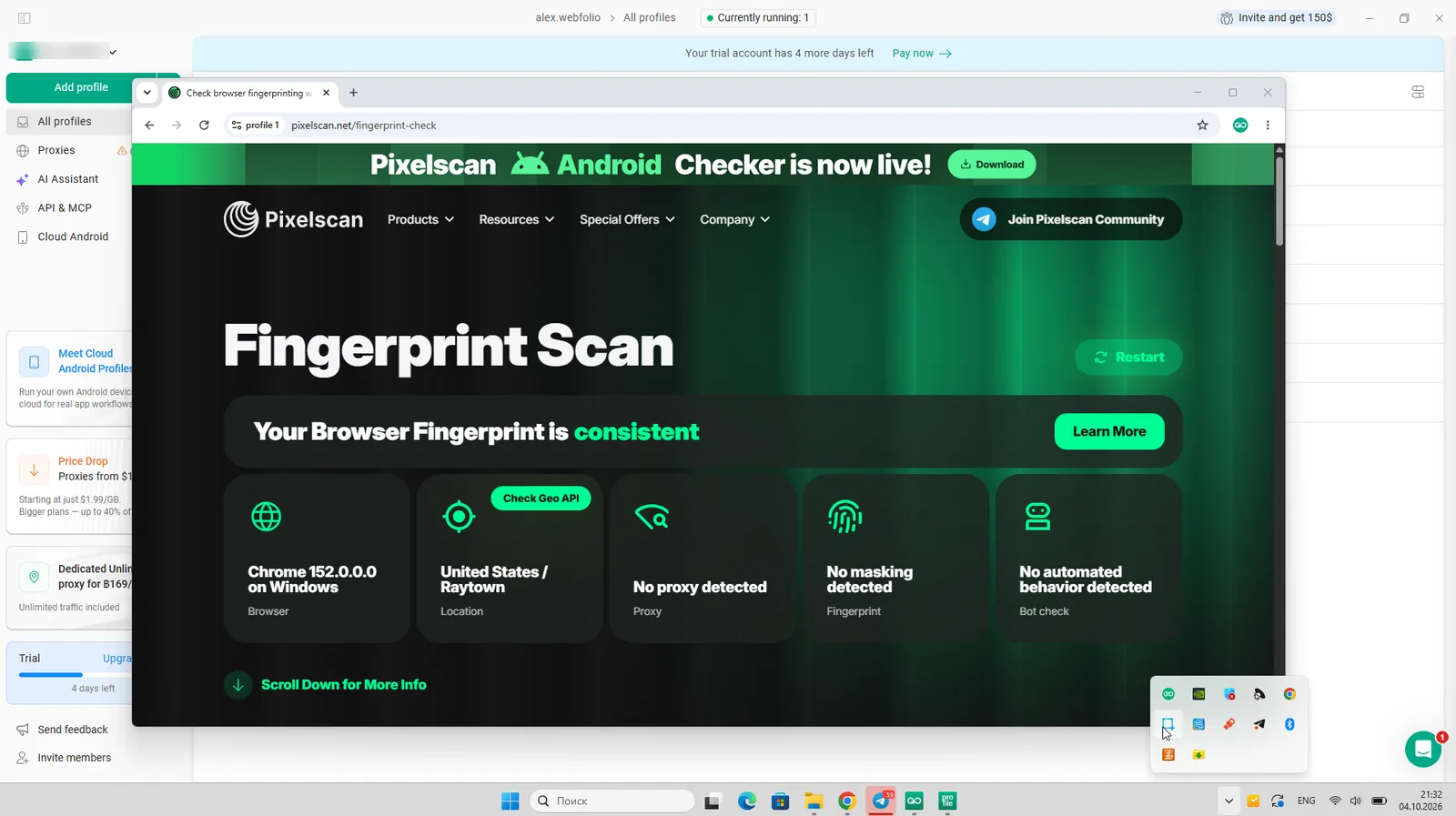
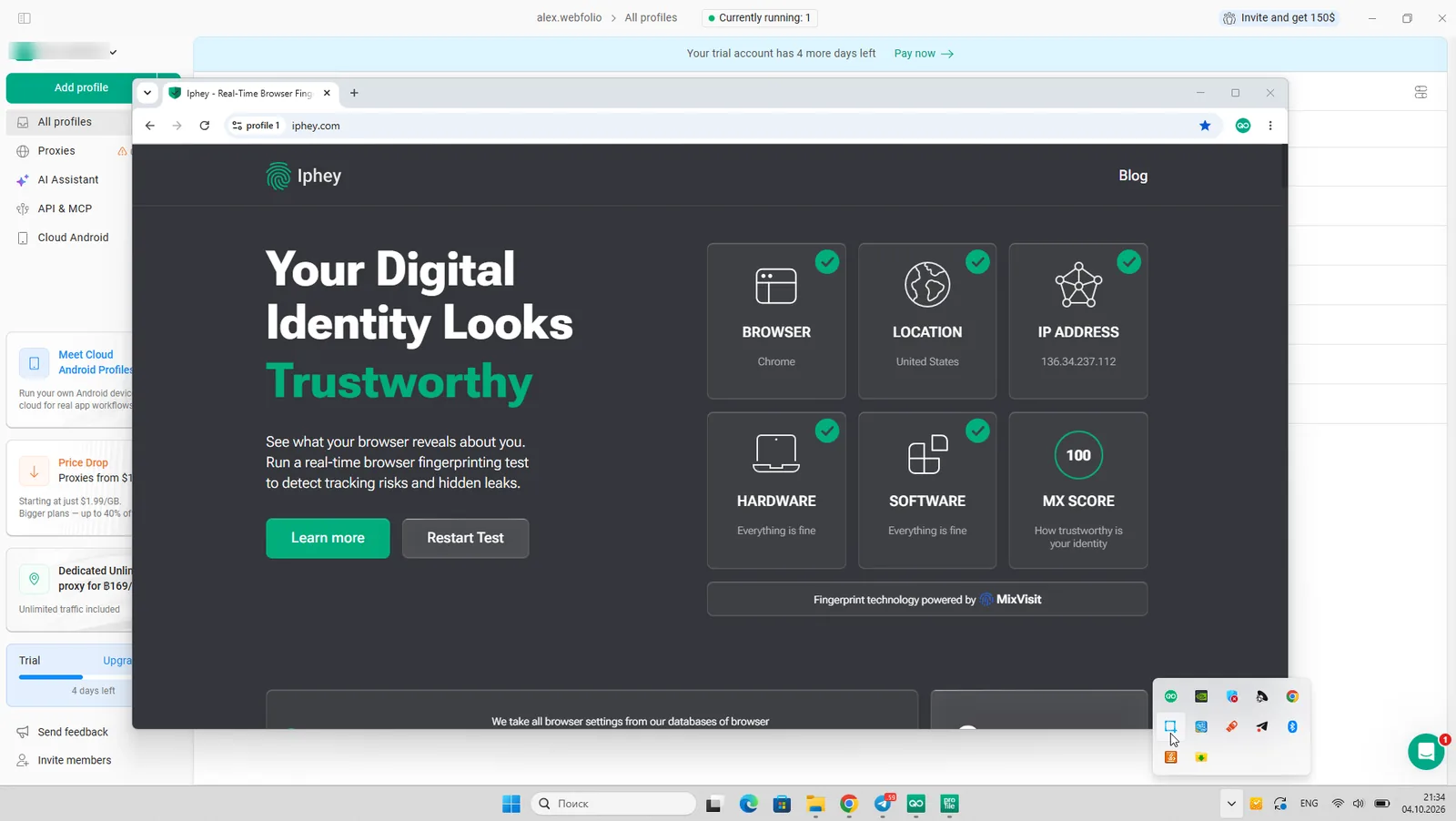
Gologin runs profiles in Orbita, its own Chromium-based browser. On our residential US proxy, Pixelscan rated the fingerprint consistent and found no proxy, and Iphey gave it a full Trustworthy score of 100. Timezone, language and location matched the proxy IP automatically, with no manual setup.
Launch speed stayed almost where it was in our previous test: three launches took 4.3, 4.0 and 3.9 seconds, against a median of about 3.5 seconds last time.
CreepJS. No headless or stealth signals (0% and 0%) and no detected lies. The softer “like headless” heuristic came out at 31%, a bit higher than the 25% most other browsers showed. That isn’t a failure, but it’s the one number where Gologin trails the field.
What could be better. Orbita was on Chrome 152 on the test day, two versions behind stable Chrome 154. Octo Browser and Dolphin Anty were already on 154.
Beyond fingerprints:
- Built-in residential, mobile and datacenter proxies in 195 countries
- A native Android app that syncs with desktop profiles, plus cloud Android profiles
- Cloud browser launches, a REST API and an MCP server for AI agents
- Puppeteer, Playwright and Selenium support
Price. Free plan with 3 profiles, a 7-day trial of all features, and paid plans from $9/month or $4.50/month on a yearly plan.
Best for: solo operators and small teams who want a clean fingerprint, built-in proxies and Android at the lowest price.


2. Octo Browser: the strongest newcomer
Result: passed Pixelscan, Iphey and CreepJS. Launch 4.8 s. From €7/month.

Octo Browser is new to our ranking but not to the market, and it tested like a mature product. Pixelscan rated it consistent, Iphey gave it a Trustworthy score of 100, and CreepJS found no headless or stealth signals and no lies. The GPU was reported with high confidence and the timezone matched the proxy location.
Octo was also one of only two browsers already on Chrome 154, the latest stable version on the test day. Launches took 4.3, 5.9 and 4.8 seconds.
What could be better. There is no free plan, only a 2-day trial with the promo code TRIAL. The cheapest Lite plan includes just 3 profiles, and API access starts from the Base plan.
Beyond fingerprints: a proxy manager, team roles, and mobile apps for iOS and Android.
Price. Lite from €10/month (€7/month yearly) for 3 profiles; Starter from €29/month (€21/month yearly).
Best for: teams that want an up-to-date engine and are fine paying from day one.


3. Hidemium: the biggest improvement
Result: passed Pixelscan, Iphey and CreepJS. Launch 4.5 s. From $153/year.

In our previous test Hidemium couldn’t pass a single checker, with proxy and timezone mismatches. This time it passed all three: Pixelscan consistent, Iphey Trustworthy at 100, and CreepJS with no headless, stealth or lie signals. Launch speed held at about 4.5 seconds, with launches of 4.5, 4.7 and 4.3 seconds.
The engine was on Chrome 153, one version behind the latest.
Beyond fingerprints: a choice of browser engines and profile operating systems, including Android and iOS profile types, and an AI assistant that writes automation scripts.
Price. A free plan and paid plans from $153/year (Basic).
Best for: budget-conscious users who want a clean fingerprint and AI-assisted automation.


4. 1Browser: fastest launch and a generous free plan
Result: passed Iphey and CreepJS, failed Pixelscan. Launch 2.5 s, the fastest in the test. From $7/month.

1Browser launched faster than any other browser: 1.9, 2.5 and 2.5 seconds. Iphey rated it Trustworthy with a score of 100, and CreepJS found no headless, stealth or lie signals.
Pixelscan. Pixelscan never finished scanning 1Browser. On our FloppyData proxy it detected the proxy, rated the fingerprint inconsistent and kept looping on “Collecting data”. The same proxy passed cleanly in Gologin, so the proxy wasn’t the cause. A second 1Browser profile on a different proxy got stuck at “scanning” as well, and we saw the same behavior on two computers.
Built-in proxies. 1Browser includes proxy traffic in its plans. When we switched the profile to its built-in proxy, Pixelscan detected the proxy and rated the fingerprint inconsistent. With a third-party residential proxy that problem didn’t appear in Iphey or CreepJS.
What could be better. Besides Pixelscan, the engine lags behind: our two 1Browser profiles came up on Chrome 150 and Chrome 144, against the latest Chrome 154. Check which version each new profile gets.
Price. Free plan with 10 profiles; Basic from $7/month yearly ($9 monthly) with 20 profiles and 2 GB of residential traffic; Pro from $27/month yearly with 100 profiles. There is also an Android app.
Best for: testing antidetect workflows for free, or small setups where launch speed matters.


5. Multilogin: enterprise features, weaker results this round
Result: passed Pixelscan and CreepJS, failed Iphey. Launch 7.4 s, the slowest in the test. From $149/year.

Multilogin lost ground since our last test. Pixelscan still rated its Mimic profile consistent, and CreepJS found no headless, stealth or lie signals. But Iphey marked the browser fingerprint as inconsistent and rated the profile Unreliable (90), where last time it passed.
Launches also slowed down: 8.7, 7.4 and 7.3 seconds, against about 5 seconds in our previous test. The engine was on Chrome 153.
Beyond fingerprints: cloud Android phones, team roles and premium proxy traffic included in the plans.
Price. A free plan with 5 profiles, 200 MB of proxy traffic and 30 cloud-phone minutes; Pro from $149/year.
Best for: larger teams that need Multilogin’s management features and can verify fingerprints on their own target sites.


6. Dolphin Anty: the media buyer’s favorite
Result: passed Pixelscan and CreepJS, failed Iphey. Launch 5.6 s. From $10/month.

Dolphin Anty fixed its Pixelscan problem from last time: the fingerprint was rated consistent with no proxy detected. CreepJS also came back clean. Iphey, however, flagged two inconsistent browser fingerprint signals and rated the profile Unreliable with a score of 50.
Launches were slower than last round: 6.6, 4.6 and 5.6 seconds, against 3 to 4 seconds before. On the plus side, Dolphin was one of two browsers on the latest Chrome 154.
Beyond fingerprints: team workflows built around ad accounts, a scenario builder and local and remote API.
Price. A free plan; Starter from $10/month for 20 profiles, Base from $89/month for 100 profiles.
Best for: affiliate and media buying teams that rely on Dolphin’s team tools.


7. MoreLogin: budget option with cloud phones
Result: passed Pixelscan and CreepJS, failed Iphey. Launch 4.6 s. From $5.40/month.

MoreLogin improved on Pixelscan: last time it was flagged as inconsistent on an outdated Chrome 137 engine, and this time it passed on Chrome 152. CreepJS found no problems. Like Multilogin, though, it got an Unreliable verdict (90) from Iphey for an inconsistent browser fingerprint, which is exactly the kind of signal a real anti-fraud system can pick up.
Launches took 4.6, 4.6 and 3.4 seconds.
Beyond fingerprints: cloud Android phones billed per minute or per month, and a local API with Selenium and Puppeteer on every plan.
Price. A free plan with 2 profiles; Pro from $9/month or $5.40/month yearly for 10 profiles.
Best for: small budgets that need a few desktop profiles plus cloud phones.


8. GeeLark: cloud phones for TikTok and mobile apps
Result: passed Pixelscan and CreepJS, failed Iphey. Launch 6.2 s. From $9.75/month.

GeeLark improved a lot on desktop. Last time it failed both Pixelscan and Iphey and took over 12 seconds to launch. This time Pixelscan rated it consistent, CreepJS came back clean, and launches took 6.7, 5.9 and 6.2 seconds, about twice as fast. Iphey still flagged an inconsistent browser fingerprint (Unreliable, 90).
What could be better. New profiles ran on Chrome 142, the oldest engine in this test and 12 versions behind the latest. Newer engines up to Chrome 151 are available to download in GeeLark’s settings, so check which version your profiles use.
Beyond fingerprints: GeeLark is built around cloud Android phones, real virtual devices for running mobile apps, not only a mobile browser.
Price. A free plan with 2 profiles and 30 cloud-phone minutes; Base from $9.75/month and Pro from $14.25/month on yearly plans.
Best for: TikTok and other mobile-app work where you need full Android, not a browser.


9. NstBrowser: automation first
Result: passed Pixelscan and CreepJS, failed Iphey. Launch 4.7 s. From $29.90/month.

NstBrowser looked the same as last time, which in this case isn’t good news. Pixelscan and CreepJS passed, but Iphey gave it the lowest score in the test: Unreliable, 30. It flagged both the browser fingerprint and the location data as inconsistent. The profile also came with Spanish (es-US) as its language on a US proxy, which is worth fixing by hand.
Launches took 4.7, 4.9 and 4.1 seconds. The engine was on Chrome 149, five versions behind the latest.
Beyond fingerprints: NstBrowser is built for automation, with RPA, an API, Puppeteer and Playwright support, and built-in CAPTCHA solving.
Price. A free plan; paid plans from $29.90/month (Starter), $49.90 (Growth) and $89.90 (Scale).
Best for: developers who run scraping and automation at scale and tune profiles themselves.


10. AdsPower: strong automation, weak fingerprint this round
Result: passed CreepJS, failed Pixelscan and Iphey. Launch 3.4 s. From $5.40/month.

AdsPower is new to our ranking and didn’t do well on anonymity. Pixelscan detected a spoofed timezone: the profile reported America/Anchorage on a proxy from South Carolina. Iphey flagged an inconsistent browser fingerprint and rated the profile Unreliable (70). CreepJS was the only checker it passed cleanly.
The first launch took 13.6 seconds while AdsPower configured the profile; the next two took 3.3 and 3.4 seconds. The SunBrowser engine was on Chrome 153, and a Firefox-based FlowerBrowser engine is also available.
We didn’t change any profile settings besides adding the proxy, so the timezone mismatch is AdsPower’s default behavior. If you use AdsPower, set the timezone to match the proxy IP and check it on every new profile.
Beyond fingerprints: RPA workflows, a synchronizer for many windows, an AI agent, API and MCP access, and cloud phones.
Price. A free plan with 2 profiles; Professional from $9/month or $5.40/month yearly for 10 profiles; Business from $36.60/month yearly.
Best for: teams that need no-code automation and will check timezone settings on every profile.


11. Incogniton: the weakest result in this test
Result: failed Pixelscan, Iphey and CreepJS. Launch 6.7 s. From $13.99/month.

Incogniton was the only browser that every checker flagged. Pixelscan detected the proxy and a spoofed timezone. Iphey found inconsistent browser fingerprint signals and rated the profile Unreliable (50).
It was also the only browser CreepJS caught lying: the audio fingerprint was marked as spoofed. CreepJS also showed a Russian system voice (Microsoft Irina) in the speech list of a US English profile, a leak from the host computer. The profile itself looked like a low-end laptop, with 2 CPU cores, 4 GB of RAM and a 1280×960 screen.
Launches took 6.7, 6.8 and 6.4 seconds, the second slowest after Multilogin. The engine was on Chrome 152.
Price. A free plan with 10 profiles for 2 months, then 3; Starter Plus from $13.99/month billed every 6 months; API and Selenium/Puppeteer from the $20.99/month plan.
Best for: experienced users who will configure fingerprints by hand. With default settings, we wouldn’t use it for valuable accounts.


12. Kameleo: failed to start
Result: not tested. The app didn’t launch on our test machine.
We couldn’t retest Kameleo this round. On the same computer where the other 11 browsers ran, Kameleo kept showing “Failed to start. If another Kameleo instance is running, please close it first, then restart”, although no other instance was running. Rebooting and updating didn’t help.
In our previous test Kameleo failed both Pixelscan and Iphey because of location mismatches. It remains known for mobile browser emulation and a developer-friendly local API with SDKs for Python, JavaScript and C#.
Price. A free plan with 2 concurrent browsers and 300 minutes a month; paid plans from €59/month or €45/month yearly.

Our video review from the previous test round. Updated results are in the tables above.
Best free antidetect browsers
Eleven of the twelve browsers we tested have a free plan; only Octo Browser offers just a short trial. A free plan is enough to test fingerprints and run a few accounts, but the limits differ a lot.
| Browser | Free plan | Passed all 3 checkers in our test? |
|---|---|---|
| 1Browser | 10 profiles | No (Pixelscan) |
| Incogniton | 10 profiles for 2 months, then 3 | No |
| Multilogin | 5 profiles, 200 MB proxy traffic, 30 cloud-phone minutes | No (Iphey) |
| Hidemium | 5 profiles | Yes |
| Dolphin Anty | 5 profiles | No (Iphey) |
| Gologin | 3 profiles forever, plus a 7-day trial of all features | Yes |
| AdsPower | 2 profiles | No (Pixelscan, Iphey) |
| MoreLogin | 2 profiles | No (Iphey) |
| GeeLark | 2 profiles, 30 cloud-phone minutes | No (Iphey) |
| Kameleo | 2 concurrent browsers, 300 minutes a month | Not tested |
| NstBrowser | Limited free plan | No (Iphey) |
How to choose. For the most free profiles, start with 1Browser. If a clean fingerprint matters more than the profile count, Hidemium and Gologin were the free options that passed every checker. Gologin’s 7-day trial also unlocks the full product, and the 3 free profiles stay after it ends.
What free plans don’t solve. None of them include enough proxy traffic for real work. Every profile still needs its own clean proxy, and that usually costs more than the browser. Free plans also rarely include team sharing or API access.
Avoid cracked versions. “Free” builds of paid antidetect browsers from unofficial sources often leak your real IP or carry malware that steals cookies and sessions. Use official free plans only.
Antidetect browsers for Android
TikTok, Instagram and Facebook are mobile-first, so a desktop profile that only pretends to be a phone is easier to spot. In 2026 there are three ways to run antidetect profiles on Android, and they aren’t equal.
- A native Android antidetect app. The browser runs on a real phone with a real Android identity. Gologin’s Android app is included in every plan, supports proxies and syncs profiles with desktop: start on your computer, continue on your phone. 1Browser and Octo Browser also offer mobile apps.
- Cloud Android phones. You rent a virtual Android device in the cloud and control it from your computer. GeeLark is built around this, and Multilogin, MoreLogin and AdsPower offer cloud phones too. They are billed by the minute or by the month, so costs grow quickly with many accounts.
- Mobile emulation on desktop. The desktop browser reports a mobile user agent and screen. Kameleo and others do this. It’s the cheapest option, but the least convincing, because the hardware underneath is still a computer.
Which to choose: a native app if you work from a phone and want desktop and mobile on one account; cloud phones if you need full Android apps, not only a browser; emulation only for light tasks.
For a full comparison, see our guide to the best antidetect browsers for Android.
How to set up a proxy in an antidetect browser
An antidetect browser hides your device; a proxy hides your network. You need both: a perfect fingerprint behind the same IP as ten other accounts still gets those accounts linked. Our test shows the other side of it too: in two browsers, Pixelscan caught a timezone that didn’t match the proxy location.
The one rule: one profile, one IP
- Give every profile its own proxy and keep it for the life of the account.
- Use sticky (static) sessions, not IPs that rotate on every request. An account whose IP changes city every few minutes looks hijacked.
- Match the proxy country to the account: a US account logs in from a US IP.
- Let the browser set timezone, language and geolocation from the proxy IP, then check them. A South Carolina IP with an Alaska timezone is exactly what Pixelscan flagged in AdsPower.
Which proxy type to use
| Proxy type | Best for | Trade-off |
|---|---|---|
| Residential | Social media, marketplaces, ad accounts | Costs more; billed per GB |
| Mobile (4G/5G) | TikTok, Instagram, high-risk accounts | Most trusted IPs, highest price |
| Datacenter | Scraping, testing, low-risk sites | Cheap and fast, but easy to flag on social platforms |
How to add a proxy in Gologin
- Open All profiles and find the profile.
- In the Location column, click + and choose the computer icon to add your own proxy.
- Paste the proxy (IP, port, login and password). Gologin picks HTTP or SOCKS5 automatically.
- Click Connect. Gologin checks the proxy and shows a green status if it works.
- Start the profile. Timezone, language and geolocation are set from the proxy IP.
- Open Pixelscan in the profile to confirm the IP and fingerprint match.
Many profiles at once. Paste a list of proxies into the Location column, or go to Proxies → Import proxies. Accepted formats include IP:port:login:password and socks5://login:password@IP:port. To change proxies on many profiles, select them and use Proxy in bulk actions.
No proxy yet? Gologin includes built-in residential, mobile and datacenter proxies in 195 countries. See the proxy setup guide for details.
What changed in 2026
Detection in 2026 is less about one fingerprint check and more about whether everything in a session adds up. Our results show it: every browser passed CreepJS’s headless and stealth checks, but most failed on consistency. Five shifts matter most.
1. Trust scores replace hard blocks. Platforms rarely ban on the first suspicious signal. They score each session and add friction quietly: more captchas, verification requests, lower ad delivery. Bad setups don’t fail at once; they lose trust over weeks.
2. Consistency is the new battleground. Each parameter has to fit the others: a US IP with an Alaska timezone, a US English profile with a Russian system voice, or a Spanish language on a US proxy all showed up in this test. Iphey’s “inconsistent browser fingerprint” verdict hit 7 of 11 browsers.
3. Network fingerprints count as much as browser fingerprints. Sites compare the TLS and HTTP/2 handshake with the browser the profile claims to be. If the user agent says Chrome 154 but the handshake looks like an older build, the mismatch is visible before the page loads.
4. Engine updates matter. That’s why we now report engine versions. On the test day, engines ranged from Chrome 142 to 154. The further a profile lags behind real Chrome, the smaller and more suspicious the crowd it blends into.
5. Automation and AI agents are detected separately. Headless mode, CDP traces and default Puppeteer or Playwright setups are well known to anti-bot systems. At the same time, more teams run AI agents through antidetect profiles, and browsers now compete on clean automation: APIs, cloud launches and MCP servers that let an AI agent control a real profile.
What this means for choosing a browser: look for a frequently updated engine, fingerprints taken from real devices, automatic matching of timezone and geo to the proxy, and automation that leaves no headless traces. Then test with more than one checker before you trust a profile with real accounts.
Final verdict: which antidetect browser to choose
No antidetect browser is invisible, but the gap between them is real: three of twelve passed every checker on default settings, and one didn’t start at all.
| If you need… | Choose | Why |
|---|---|---|
| The best balance of anonymity and price | Gologin | Passed all 3 checkers, from $4.50/month, free plan, Android app |
| A paid team tool on the newest engine | Octo Browser | Passed all 3 checkers, Chrome 154 |
| The cheapest clean result | Hidemium | Passed all 3 checkers, from $153/year |
| Many free profiles and fast launches | 1Browser | 10 free profiles, 2.5 s launch; Pixelscan didn’t complete |
| Full Android apps in the cloud | GeeLark | Cloud phones; check the engine version |
| Ad-account team workflows | Dolphin Anty | Team tools, Chrome 154; verify fingerprints on your targets |
| No-code automation | AdsPower or NstBrowser | RPA and APIs; check timezone and language on every profile |
Whatever you pick, run your own profile through Pixelscan, Iphey and CreepJS with the proxy you’ll actually use, and keep one profile per proxy IP. You can try Gologin free for 7 days and run the same tests yourself.
FAQ
What is an antidetect browser?
An antidetect browser lets you run many browser profiles on one computer, each with its own fingerprint, cookies and proxy. Websites see each profile as a different device, so your accounts aren’t linked. Marketers, e-commerce sellers, agencies and scraping teams use them to manage multiple accounts safely.
What are the top 5 anti-detect browsers?
In our October 2026 test, Gologin, Octo Browser and Hidemium passed Pixelscan, Iphey and CreepJS. 1Browser stood out for its fast launch and 10 free profiles, and Dolphin Anty for team workflows on the newest engine, though Iphey flagged its fingerprint. The best choice depends on your budget, team size and whether you need Android.
Is there any free anti-detect browser?
Yes. Eleven of the twelve browsers we tested have a free plan. 1Browser gives 10 free profiles, Hidemium, Multilogin and Dolphin Anty give 5, and Gologin gives 3 profiles forever plus a 7-day trial of all features. Free plans don’t include enough proxy traffic for real work.
Which browser is the most untraceable?
For anonymity, Tor Browser is the hardest to trace, because it routes traffic through several relays and makes users look alike. But Tor is often blocked and gives you one identity. If you need several separate identities that look like ordinary users, an antidetect browser with a clean proxy for each profile is the better tool.
Is Ghost Browser an antidetect browser?
Not fully. Ghost Browser separates sessions and lets you set a proxy per tab or identity, which helps with productivity. It doesn’t offer the deep fingerprint spoofing of true antidetect browsers, so sites can still see that all sessions come from the same device.
Which browser is best for preventing fingerprinting?
For personal privacy, Tor Browser, Brave and Firefox with fingerprinting protection reduce what sites can learn about you by blocking or blending in. Antidetect browsers work differently: they give each profile a complete, realistic fingerprint, which is what you need when you run several accounts.
Do I need a proxy with an antidetect browser?
Yes. An antidetect browser changes your device fingerprint, but not your IP. If several profiles share one IP, platforms can link them. Use one sticky residential or mobile proxy per profile, in the same country as the account, and check that the timezone matches it.
Are antidetect browsers legal?
In most countries, yes. Antidetect browsers are legal software for privacy, multi-account management, ad verification and testing. What you do with them still matters: breaking a platform’s terms can get accounts banned, and fraud is illegal with any browser.